Motu Patlu AI Video Editing Prompt 2026: Artificial Intelligence has completely transformed the way people create digital content. In 2026, one of the biggest viral trends on Instagram Reels, YouTube Shorts, and Facebook is the Motu Patlu AI Video Editing Prompt. Instead of spending hours editing videos manually, creators can now generate realistic animated videos of the famous cartoon duo simply by using AI prompts.
This trend has become popular because anyone can create customized videos where Motu and Patlu appear to speak personalized dialogues. Whether you want them to mention your village, city, business, friend’s name, or deliver a funny message, AI tools make the entire process simple and quick. Even beginners with no editing experience can produce professional-looking results within minutes.
In this guide, you’ll learn everything you need to know about creating Motu Patlu AI videos, from generating the AI image to producing a realistic talking animation. At Sonu Editor, we regularly share the latest AI editing tutorials and trending prompts to help creators make engaging social media content.
What Is the Motu Patlu AI Video Editing Prompt?
The Motu Patlu AI Video Editing Prompt is a ready-made text instruction that helps AI tools generate realistic images and animated videos featuring the popular cartoon characters Motu and Patlu. Instead of drawing or animating the characters yourself, you simply enter a detailed prompt into an AI image generator and then use the generated image inside an AI video creation platform.
The AI automatically creates realistic backgrounds, facial expressions, body movements, and synchronized lip movements. The result looks surprisingly natural and is ideal for short-form content on Instagram Reels, YouTube Shorts, Facebook Reels, and other social media platforms.
Why Is This AI Trend So Popular?
There are several reasons why this editing style has become one of the most shared AI trends in 2026.
- No professional editing skills are required.
- Videos can be created within a few minutes.
- Dialogues can be fully personalized.
- Village names, city names, schools, businesses, or friends’ names can be added easily.
- AI handles the animation automatically.
- The videos are perfect for creating engaging short-form content.
Since every video can be customized, creators can produce unique content without repeating the same script.
Step 1: Generate the AI Image
The first stage is creating a high-quality AI image.
Copy your preferred image prompt and open any AI image generator that supports detailed text prompts. Replace the default location and dialogue with your own information. You can mention your hometown, village, market, shop, business name, or any location you want.
After submitting the prompt, the AI generates a realistic scene showing Motu and Patlu standing in your chosen location. Download the image because it will be used during the video generation process.
The better your image prompt, the more realistic your final video will appear.
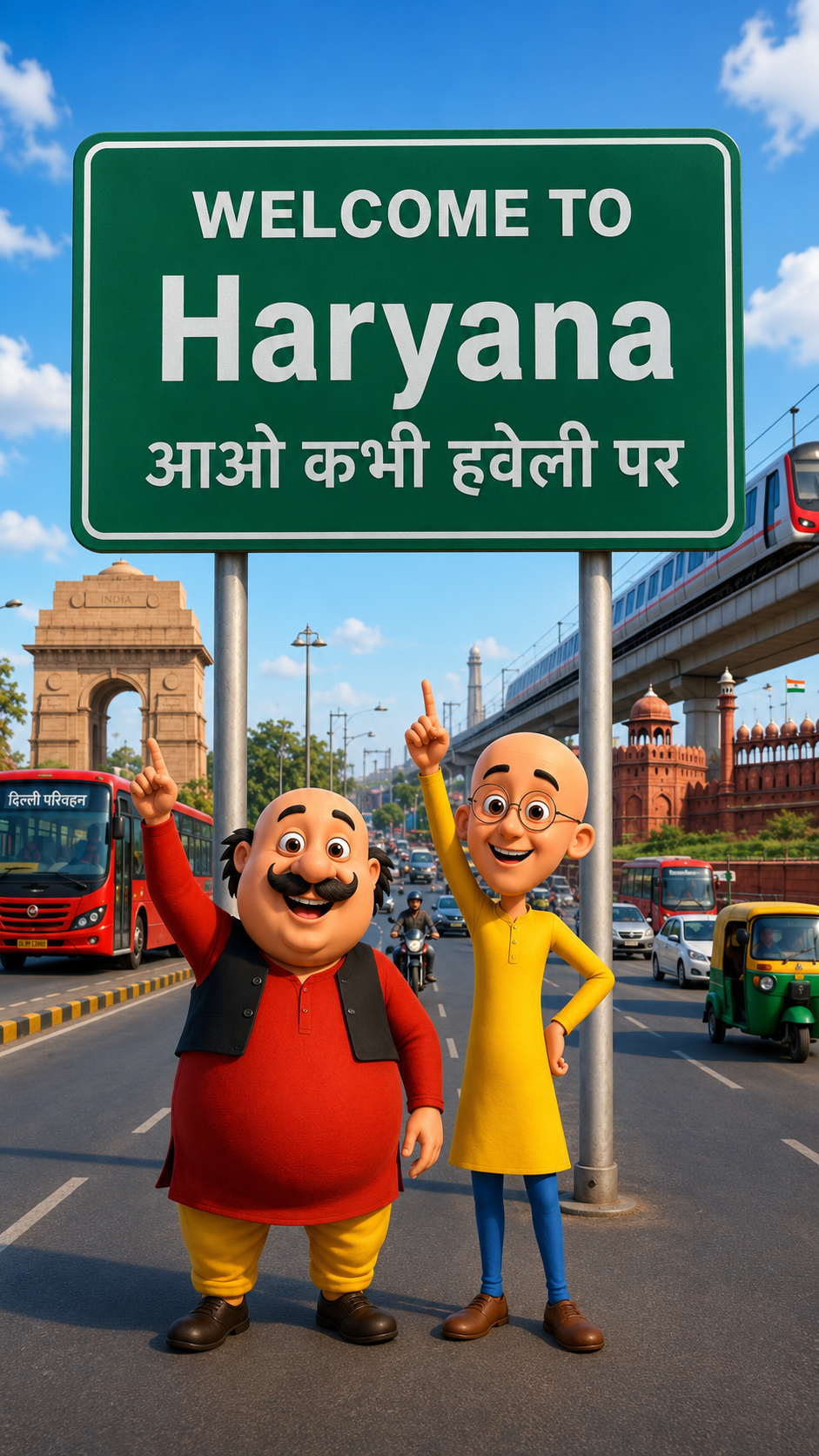
Image Prompt –
Create a high-quality 3D cartoon-style scene inspired by classic Indian animation. Two funny cartoon friends stand in the middle of a wide modern Indian city road, smiling and pointing upward. The left character is a chubby man with a big black moustache, wearing a red kurta, yellow pajama, black waistcoat, and black shoes. The right character is a slim bald man with round glasses, wearing a yellow kurta, blue pants, and brown shoes, raising one finger upward.Behind them is a large green highway signboard supported by two silver poles. The signboard has a white border and bold white text exactly as follows:WELCOME TO Haryana आओ कभी हवेली पर The text must be perfectly centered, sharp, correctly spelled, and use realistic Indian highway sign typography.Background: A busy Indian city with India Gate on the left, Red Fort on the right, a metro train on an elevated track, red city buses, auto-rickshaws, motorcycles, cars, streetlights, trees, and a bright blue sky with soft white clouds.Camera angle: Eye-level, wide-angle, centered composition.Lighting: Bright natural daylight with soft realistic shadows.Style: Ultra-detailed Pixar-quality 3D cartoon render, vibrant colors, smooth textures, cinematic lighting, depth of field, Ultra HD, 8K, highly detailed, professional animation quality.Vertical composition (9:16), realistic road markings, clean perspective, sharp focus, vibrant colors.
Video Prompt –
Create a 10-second ultra-realistic 3D animated video using the uploaded image as the exact reference. Keep Motu, Patlu, their clothes, expressions, and the highway background unchanged. Add natural lip-sync, blinking, facial expressions, hand gestures, and slight handheld camera movement. Motu smiles, waves, and says:”हेलो दोस्तों मैं मोटू हूँ। आज मैं हरियाणा घूमने आया हूँ। यहाँ का माहौल बहुत बढ़िया है। आज मैं हरियाणा का गरमा गरम समोसा खाऊंगा। Now Patlu speaks.”दोस्तों, यह शहर बहुत ही सुंदर है। अगर मौका मिले, तो यहाँ ज़रूर आइए!” Add realistic highway ambience, passing vehicles, birds, light wind, cinematic lighting, smooth animation, 4K, vertical 9:16.
Step 2: Convert the Image into an AI Video
Once your AI image is ready, the next step is animation.
Open your favorite AI video generation platform and start a new project. Upload the image you created and paste the AI video prompt into the prompt section. If needed, modify the dialogue, emotions, expressions, or camera movements to match your idea.
After clicking the Generate button, the AI processes the request and creates a realistic animated video. The finished clip usually shows Motu and Patlu naturally speaking your custom dialogue while standing near a road, village entrance, market, or another selected location.
Most AI platforms complete this process within only a few minutes.
Tips for Better AI Videos
To make your videos look more professional, consider these simple tips:
- Use detailed image prompts.
- Keep dialogues short and natural.
- Choose high-resolution image generation.
- Add realistic background descriptions.
- Use clear character expressions.
- Generate videos in HD quality.
- Keep videos under one minute for better engagement.
These small improvements can significantly enhance the overall quality of your content.
Final Thoughts
The Motu Patlu AI Video Editing Prompt is one of the easiest ways to create entertaining AI-generated videos in 2026. With only an image prompt and a video prompt, you can generate personalized animations featuring custom dialogues, village names, city names, or humorous conversations without learning complex editing software.
Whether you’re creating content for fun, social media, or your personal brand, this AI workflow saves both time and effort while producing impressive results. For more trending AI prompts, editing tutorials, and step-by-step guides, keep visiting Sonu Editor, where you’ll always find the latest AI content creation ideas.
Frequently Asked Questions (FAQs)
1. What is the Motu Patlu AI Video Editing Prompt?
It is a text prompt that allows AI tools to generate realistic Motu and Patlu images and animated talking videos with personalized dialogues.
2. Do I need video editing experience?
No. The entire process is AI-powered, making it suitable for beginners as well as experienced creators.
3. Can I customize the dialogue?
Yes. You can add your own dialogue, village name, city name, business name, friend’s name, or any custom message.
4. Which platforms support these AI videos?
These videos are ideal for Instagram Reels, YouTube Shorts, Facebook Reels, WhatsApp Status, Snapchat, and similar short-video platforms.
5. How long does it take to create the video?
Most AI tools generate the complete video within a few minutes, depending on the platform and internet speed.
6. Can I use these videos for social media content?
Yes. Many creators use personalized AI videos to create engaging and entertaining content for their social media audiences.
7. Are the prompts free to use?
Many AI prompts are freely available, although some AI image and video generation platforms may require a premium subscription for advanced features.
8. What makes this trend unique?
Its biggest advantage is complete personalization. You can create a unique video by changing names, locations, dialogues, and scenes without manually editing anything.