Couple On Tower AI Photo Video Editing: AI-powered video creation has completely changed the way people create content for social media. Every week, a new editing trend grabs millions of views across Instagram Reels, YouTube Shorts, and Facebook. One of the most talked-about trends right now is Couple On Tower AI Photo Video Editing. This eye-catching effect places a couple on top of a massive tower while a customized flag waves dramatically in the wind. Combined with cinematic lighting, aerial drone movement, and realistic animation, the final result looks like it was filmed by a professional production team.
The most surprising part is that you don’t need expensive cameras, advanced editing software, or professional editing experience. Modern AI tools can generate both the image and video within minutes using a simple reference photo and well-written prompts. In this guide, you’ll learn exactly how to create this trending effect from start to finish.
What Is Couple On Tower AI Photo Video Editing?
Couple On Tower AI Photo Video Editing is a creative AI trend where two people appear standing confidently on the top of an enormous communication tower. They usually wear stylish dark outfits with matching masks, giving the scene a modern and cinematic appearance.
One of the most attractive features of this edit is the giant black flag attached to the tower. Instead of displaying random text, the flag can be personalized with your own name, Instagram username, YouTube channel, or brand identity. As the flag waves naturally in the wind, the animation creates a realistic movie-like atmosphere that instantly captures attention on social media.
The final video includes dramatic clouds, beautiful lighting, realistic shadows, and smooth drone camera movements that make the scene appear completely authentic.
Why Is This AI Trend Going Viral?
There are several reasons why creators are loving this editing style.
First, it delivers an impressive cinematic look without requiring professional video editing skills.
Second, viewers enjoy personalized content. Adding your own name or logo to the waving flag makes every video unique.
Another reason is its compatibility with short-form video platforms. The dramatic opening scene and aerial movement keep viewers engaged, making it perfect for Instagram Reels, Facebook Reels, YouTube Shorts, and similar platforms.
Most importantly, anyone can create this effect using AI in just a few simple steps.
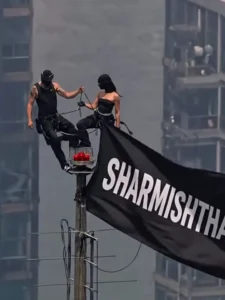
Couple On Tower Image Prompt –
Create an ultra-realistic vertical 9:16 cinematic drone shot of two young Indian adults standing on the tiny top platform of a very tall communication tower above a huge modern city skyline. The city below is blurred with atmospheric haze, giving an extreme height and vertigo feeling.A young man with curly black hair and short beard is wearing an all-black outfit, standing confidently with one foot raised and one hand holding the antenna pole. Beside him, a youna woman in a black sleeveless outfit stands calmly, also holdir.g the pole. A large black flag is attached to the tower and blowing strongly in the wind.On the flag, write in bold white uppercase text:Sonueditor.com SE PROMPT LELOAUR HO JAO VIRALKeep the text clearly readable, centered on the flag, slightly following the cloth folds. Realistic lighting, warm daylight, telephoto lens compression, high altitude aerial photography, detailed metal tower, cinematic shadows, documenta. y realism, 8K, HDR, no extra people, no logo, no watermark
Couple On Tower Video Prompt –
animate this photo as the flag is weaving in slow wind. Keep the rest still and add a little zoom in motionAspect Ratio 9:16
Features of This Trending AI Edit
This viral editing style offers several premium-looking visual effects that make the final video stand out.
Some of its main highlights include:
- Massive communication tower with realistic textures.
- Stylish couple standing confidently at the top.
- Personalized black flag with custom text.
- Natural wind animation.
- Realistic drone camera movement.
- Cinematic lighting and dramatic skies.
- Ultra-high-quality 4K visuals.
- Smooth AI-generated animation.
These elements work together to produce an eye-catching social media video that looks professionally filmed.
Step 1: Generate the AI Image
The first stage involves creating a high-quality AI image.
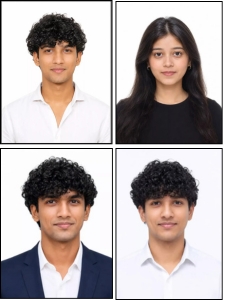
Begin by selecting a clear photo of yourself and your partner. Images with good lighting and visible facial details usually produce the best results.
Upload the reference photo into your preferred AI image generator. Next, enter a detailed prompt describing the tower scene, clothing style, aerial view, dramatic environment, and customized flag.
Before generating the image, replace the sample flag text with your own name, social media username, or business name.
Within a short time, the AI creates a realistic image featuring the couple standing on top of the giant tower.
If you want additional inspiration for AI editing tutorials, Sonu Editor regularly shares creative prompts and easy-to-follow editing guides for beginners and content creators.
Step 2: Convert the Image into an AI Video
Once the AI image is ready, the next step is turning it into a realistic animated video.
Open your preferred AI video generation platform and create a new project. Upload the AI-generated image as the source file.
Now copy and paste the recommended video prompt. The prompt tells the AI how the camera should move, how the flag should wave, how the clouds should behave, and how the overall cinematic motion should look.
After clicking the Generate button, the AI starts processing the animation automatically.
Within a few minutes, you’ll receive a realistic drone-style cinematic video ready for download.
Tips for Better Results
Although AI performs most of the work automatically, a few simple improvements can make your final video look even more realistic.
Choose a sharp reference image with proper lighting.
Use highly descriptive prompts instead of short sentences.
Customize the flag using your own branding.
Avoid blurry or low-resolution photos.
Experiment with different clothing colors and weather conditions.
Generate multiple versions and select the best one.
These small adjustments can significantly improve the overall quality of your AI-generated content.
Best Platforms to Share Your AI Video
After downloading the completed animation, you can publish it across multiple social media platforms.
Popular options include:
- Instagram Reels
- YouTube Shorts
- Facebook Reels
- TikTok
- Snapchat Spotlight
Using trending music, relevant hashtags, and engaging captions can help your content reach a larger audience.
Why This Editing Method Is Beginner-Friendly
Many people assume cinematic videos require advanced editing knowledge. Fortunately, AI has changed that completely.
Instead of spending hours learning complicated software, you only need to generate an image and convert it into an animated scene. Most of the visual effects, camera movements, lighting, and animation are handled automatically by AI.
Even if you’ve never edited a video before, this method allows you to create professional-looking results with very little effort.
Creators looking for the latest AI trends can also visit Sonu Editor, where new prompts, creative editing ideas, and step-by-step tutorials are published regularly.
Final Thoughts
The Couple On Tower AI Photo Video Editing trend is an excellent example of how artificial intelligence is making cinematic content creation accessible to everyone. With only a reference photo, an image prompt, and a video prompt, you can produce an impressive drone-style animation that looks professionally shot.
Whether you’re creating content for Instagram, YouTube Shorts, Facebook, or TikTok, this editing style offers a unique way to attract viewers and increase engagement. Take time to experiment with different prompts, personalize the waving flag, and refine your visuals to create a video that truly stands out. As AI technology continues to improve, creating viral-quality content is becoming easier than ever before.
Frequently Asked Questions
Is Couple On Tower AI Photo Video Editing free to create?
Many AI platforms offer free plans with limited generations. Premium plans usually provide faster processing and higher-quality results.
Do I need professional editing skills?
No. Most of the work is completed automatically by AI, making it suitable for beginners.
Which AI tool is best for creating the image?
Several AI image generators work well. Choose one that supports detailed prompts and high-resolution image generation.
Can I customize the flag text?
Yes. You can replace the sample text with your own name, username, business name, or brand logo.
Where can I upload the final video?
You can publish it on Instagram Reels, YouTube Shorts, Facebook Reels, TikTok, and other short-video platforms.