The Ramayana Jatayu Ji AI Video Editing trend is becoming popular on Instagram, where creators are using artificial intelligence to produce impressive cinematic videos. If you regularly explore trending AI video edits, you may have already come across this unique Jatayu Ji video.
In this AI video trend, a person stands in a powerful, warrior-like pose. Suddenly, a giant mythical eagle-inspired character resembling Jatayu Ji from the Ramayana appears behind them with its enormous wings spread wide. At the same time, several small birds fly across the sky, making the scene look more dramatic and realistic.
The video uses cinematic visual effects, natural lighting, and suitable background music to create an impressive overall appearance. The best part is that you do not need professional video editing skills to make this type of content. You can use AI video generation platforms such as Google Flow AI or Gemini to create a similar result using your own photograph.
If you also want to try the trending Ramayana Jatayu Ji AI video effect, follow the steps explained below.
How to Create Jatayu Ji AI Video Using Flow AI
Google Flow AI makes it possible to turn a reference photograph into a cinematic AI-generated video. You only need a suitable image and the correct video generation prompt to get started.
Follow these steps to create your Jatayu Ji AI video:
- First, copy the Jatayu Ji AI video generation prompt provided in this article.
- Open the Google Flow AI website in your browser.
- Click on the Create with Flow option and sign in to your Google account. If you are a new user, complete the registration process.
- After signing in, check your available credits for video generation.
- Select New Project to start creating your video.
- Choose the Video Mode and Ingredient settings as required.
- Set the aspect ratio to 16:9, select Omni Flash 1, and keep the video duration at 10 seconds.
- Upload a clear photograph of yourself as the reference image.
- Copy and paste the AI video prompt into the prompt section.
- Check your selected reference image and video settings before proceeding.
- Click the Generate button and wait for Flow AI to process your request.
- Once the video is ready, preview the result and save it to your device.
Your Jatayu Ji rising AI video will then be ready to share on Instagram Reels and other social media platforms.
Jatayu Ji AI Image to Video Generation Prompt
To create this trending Ramayana Jatayu Ji AI video, use the following prompt with your reference photograph. It is designed to maintain your original appearance while adding the giant winged character and cinematic effects.
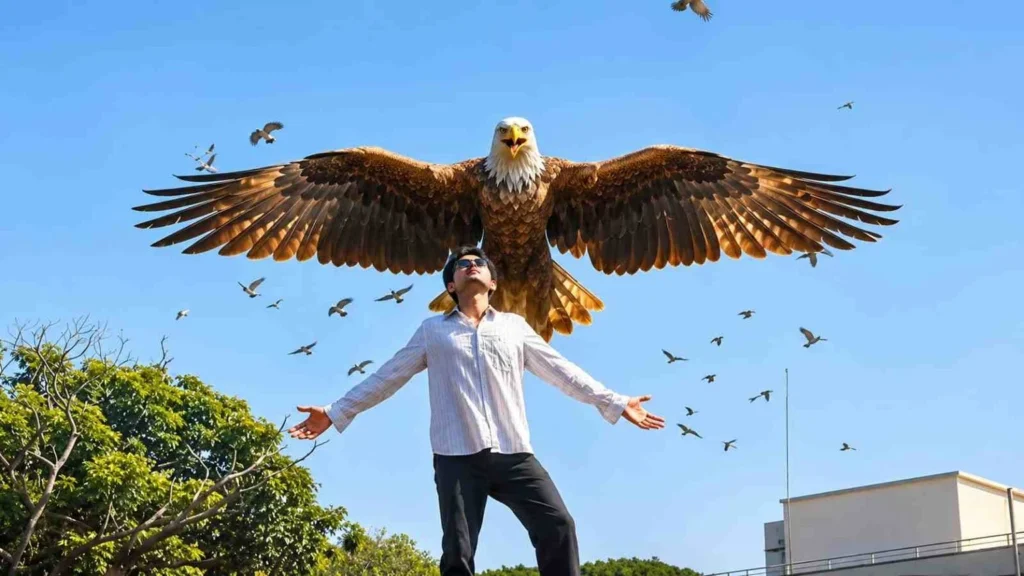
Image to Video Prompt:
Use the uploaded image as the exact starting frame and create a photorealistic, emotionally powerful Indian mythological cinematic sequence.

1. ABSOLUTE CAMERA LOCK: Keep the camera completely stationary throughout the entire video with no zoom, pan, tilt, rotation, shake, or reframing. Preserve the exact original camera angle, framing, perspective, composition, sky, buildings, horizon, and environment.

2. STRICT BOY POSE LOCK: The boy in the foreground must remain completely frozen in his exact original pose throughout every frame. Preserve his exact body position, silhouette, proportions, clothing, and posture. Both arms must remain extended sideways at exactly the same angles. Hands, fingers, palms, legs, head, and torso must not move. No breathing animation or body movement. The boy must remain identical to the original reference image in every frame.

3. PRESERVE ORIGINAL LIGHTNING AND LIGHTING: Preserve the original lightning exactly as it appears in the reference image. Do not remove, replace, redesign, or add any lightning. Maintain the same lightning patterns, brightness, color, and position. Preserve the original sky lighting and overall color grading without adding dramatic lighting effects.

4. JATAYU JI: DIVINE HUMAN-LIKE MYTHOLOGICAL DESIGN: Jatayu Ji must appear as a majestic divine mythological being, not an ordinary eagle. Create an original cinematic design featuring a powerful eagle-like head, noble facial structure, subtle human-like facial characteristics, and expressive eyes. His appearance should convey wisdom, courage, protection, compassion, bravery, and sacrifice. Give him majestic humanoid-bird anatomy, combining powerful human-like proportions with enormous realistic feathered wings, detailed brown and golden feathers, powerful shoulders, and a regal mythological appearance. His face must communicate intelligence and emotion, like a conscious divine guardian. Keep the entire design believable, majestic, and photorealistic.

5. ONE SINGLE POWERFUL WING FLAP: FAST TO SLOW MOTION: Jatayu Ji must initially remain hidden below the bottom edge of the frame. He suddenly rises upward from below the frame with exactly ONE strong, powerful wing flap. His wings spread outward during this single upward movement. The initial ascent must be fast, energetic, and powerful, gradually transitioning into dramatic slow motion as he reaches the upper-middle background. He then fully extends both enormous wings into a majestic wide-wing flying pose. Once he reaches this position, he must stop flapping completely and remain suspended in the sky with both wings fully spread. Only extremely subtle feather movement and natural air resistance are allowed. Absolutely no repeated wing flapping, continuous flapping, or rapid bird-like fluttering. ONE FLAP ONLY, THEN HOLD THE FINAL POSE.

6. SMALL BIRDS: Several smaller birds accompany Jatayu Ji during his entrance, flying naturally upward around him with subtle cinematic movements. A few birds may pass behind his enormous wings. Keep their numbers limited and do not overcrowd the frame. Their movement must complement Jatayu Ji's grand arrival without distracting from him.

7. TIMING: 0–1 second: Preserve the original scene with the boy perfectly frozen. 1–2.5 seconds: Jatayu Ji suddenly rises upward with one powerful wing flap. 2.5–4 seconds: His upward movement smoothly transitions from fast motion into dramatic slow motion as both wings extend fully. 4–6 seconds: Jatayu Ji holds his majestic wide-wing pose in the sky without any further flapping.

8. STRICT NEGATIVE PROMPT: No boy movement, no pose changes, no arm movement, no hand movement, no body animation, no camera movement, no composition changes, no lightning changes, no repeated wing flapping, no continuous flapping, no rapid fluttering, no ordinary eagle appearance, no cartoon anatomy, no distorted human-like face, no malformed wings, and no excessive bird movement. FINAL RESULT: Create a breathtaking Indian mythological motion-poster shot in which the boy remains perfectly motionless in his original pose while a majestic, emotionally expressive, divine Jatayu Ji rises from below with exactly one powerful wing flap. His movement transitions smoothly from fast to slow motion before he holds a magnificent wide-wing pose in the sky, surrounded by a few smaller birds. Camera: 100% locked. Boy: 100% pose locked. Lightning: Original and unchanged. Jatayu Ji: Human-like divine mythological appearance. Wing movement: One powerful flap only. Final pose: Wings fully spread and held still. Total duration: 6 seconds.
For better results, upload a clear reference photograph and make sure the image is selected correctly before generating the video.
Common Flow AI Video Generation Problems and Solutions
Sometimes, Flow AI may not generate the expected output. The final video can look different from the reference photograph, or the generation process may not work properly. You can keep a few important points in mind to improve your results.
1. Use a Muted Reference Video
If you are uploading a reference video, try using a muted version when required. Videos containing their original audio may sometimes create problems during the Flow AI generation process.
2. Upload a Clear Photograph
Your reference image plays an important role in the final result. Always choose a high-quality, well-lit photograph in which your face is clearly visible. Avoid blurry images because they may affect the generated video.
3. Select the Reference Image Properly
After uploading your photograph, make sure it is selected as the reference image for video generation. Simply uploading an image may not be enough if it has not been added to the generation settings.
4. Check Your Video Settings
Before generating the video, verify the selected mode, aspect ratio, model, and duration. Incorrect settings may produce results that do not match your expectations.
Following these suggestions can help you get better results when creating the Jatayu Ji AI video with Flow AI.
How to Generate a Jatayu Ji AI Video Using Google Gemini
Apart from Flow AI, you can also use Google Gemini for AI video generation. However, access to its video generation features depends on your subscription plan and available usage limits.
If you are a Jio SIM user, you may be eligible for a Gemini Pro offer through the MyJio application. Check the available offers in your MyJio account for more information about eligibility and activation.
After activating an eligible Gemini subscription, follow these steps:
- Download and install the Google Gemini application.
- Open the app and sign in using your Google account.
- Navigate to the Video generation option.
- Upload your reference photograph or video, depending on the available feature.
- Select the 16:9 aspect ratio if the option is available.
- Enter your Jatayu Ji AI video generation prompt.
- Start the video generation process.
- Wait until Gemini finishes creating your video.
- Preview the generated result and save it to your device.
Remember that Google Gemini video generation has usage restrictions. The number of videos you can create depends on your subscription plan and available generation limits.
Conclusion
The Ramayana Jatayu Ji AI Video Editing trend is a creative way to make eye-catching cinematic videos using artificial intelligence. With the help of Flow AI or Google Gemini, you can transform an ordinary photograph into a dramatic scene featuring a giant eagle-inspired mythical character, flying birds, and impressive visual effects.
You do not need advanced editing knowledge to experiment with this trend. Just upload a suitable reference photograph, use the provided AI video prompt, and follow the generation steps carefully.
If you are interested in creating trending AI videos for Instagram Reels and other social media platforms, give this Jatayu Ji AI video effect a try. Keep visiting Sonueditor.com for more AI video editing prompts, creative effects, and trending video editing tutorials.