Couple AI Love Story Video Editing is becoming a popular way to create romantic and cinematic social media videos with the help of AI. AI tools can turn simple photos into realistic-looking videos that feel natural and engaging. In this editing style, creators can use their own photo and their partner’s photo to create a beautiful romantic story. The complete process is simple and can be followed step by step.
Details Of AI Love Story Video Editing
This AI love story video is created with a cinematic and realistic editing style. The video starts with a boy standing near his bike on the roadside while checking his watch, showing that he is waiting for someone. After a car passes through the scene, a girl appears from the opposite side and starts walking toward him. When the boy notices her, the scene becomes more emotional and changes into smooth slow motion.
Romantic Cinematic AI Video
The complete sequence gives the feeling of a romantic movie scene. Smooth slow-motion effects, cinematic visuals, and realistic AI-generated scenes make the video attractive. With the right prompt and suitable AI video generation tool, you can recreate this style by using your own photos and your partner’s photo.
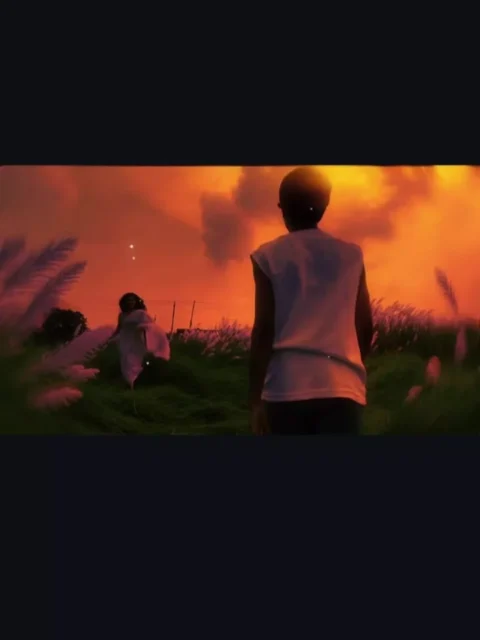
Image Prompt –
Use the uploaded photo as the main reference and keep the original person completely unchanged. Do not alter my face, facial features, hairstyle, body proportions, clothes, pose, skin tone, or any existing details.

Add one adult Indian woman in a beautiful traditional saree, running naturally from the front toward me. She should be positioned realistically in the scene, clearly facing toward me, with natural running movement and body posture. Her saree and pallu should move naturally with the motion, creating a realistic sense of movement.

She should look like a real adult Indian woman with natural facial features, realistic skin texture, authentic hair, and believable proportions. Give her an elegant, simple saree with natural fabric folds and realistic details.

Match the original photo’s camera angle, perspective, lighting, shadows, color tones, depth of field, and environment perfectly so she looks genuinely present in the original photograph rather than digitally added.

Maintain realistic interaction between her and the environment, including accurate ground contact, natural shadows, motion in the saree and hair, and correct scale relative to me.

Ultra-realistic photography, natural Indian aesthetic, cinematic composition, realistic lighting, detailed fabric texture, realistic skin, authentic proportions, professional DSLR photography, high detail, seamless photo compositing.

IMPORTANT: Do not modify or regenerate me or any existing object in the original photo. Only add the adult woman and integrate her naturally into the scene.
Video Prompt –
Use the uploaded image as the exact first-frame reference. Preserve the original scene, my appearance, clothing, body proportions, environment, fence, green field, trees, cow, sky, and overall composition exactly as they are.

Create a realistic cinematic slow-motion video.

The adult Indian woman in the saree starts running naturally toward me from the background. Her movement should be graceful and realistic, with her saree and pallu flowing naturally in the wind, hair moving softly with each step, and realistic running motion.

At the same time, I slowly walk forward away from the camera along the same path. Keep my back-facing appearance, black T-shirt, dark pants, hairstyle, body proportions, and walking direction consistent with the original image.

Both characters should move naturally and smoothly in synchronized slow motion. The woman gradually gets closer to me while I continue slowly walking forward. Maintain realistic distance and scale between both characters.

Use cinematic 60fps slow-motion aesthetics, natural body movement, subtle motion blur, realistic cloth movement, natural hair movement, accurate foot-to-ground contact, realistic shadows, and physically accurate lighting.

Camera should remain mostly stable and cinematic, with a very subtle smooth forward tracking movement. Preserve the original camera angle and composition. Do not suddenly zoom, rotate, or change the location.

Keep the rural Indian countryside atmosphere, cloudy sky, green paddy field, fence, trees, wall, and cow unchanged.

Ultra-realistic live-action footage, cinematic color grading, natural lighting, realistic physics, shallow natural depth of field, subtle film grain, high detail, smooth motion, emotional cinematic atmosphere.

IMPORTANT:
Do not change my face or appearance.
Do not redesign or alter my clothes.
Do not change the woman’s identity or clothing during the video.
Do not add extra people.
Do not distort faces, hands, legs, bodies, saree, fence, plants, or background.
No teleportation, no sudden movements, no unnatural running, no floating feet.
Maintain temporal consistency throughout the entire video.
Process Of This AI Video Editing
Creating this AI love story video does not require a complicated process. You only need three things: two photos, a video prompt, and an AI video generation tool. First, select one clear photo of yourself and another clear photo of your partner. Make sure both faces are clearly visible because the images will be used as references for generating the video.
Use Your Photos And Prompt
After preparing both photos, copy the video prompt provided in the article. The next step is to use an AI video generation tool such as Google Flow AI. Upload both reference images, add the video prompt, and start the generation process. The AI will use the provided images and prompt to create the cinematic love story video.
How To Generate AI Video?
To generate the video, first copy the video prompt and open the Google Flow website. You can also access the website through the Generate Video button provided in the article. After opening the website, log in and select New Project. Then choose Start Frame, upload your image, paste the prompt, and click the Send button.
Create Your Couple AI Love Story
After submitting the prompt, wait for the AI to complete the video generation. Once the process is finished, your AI love story video will be ready to save. The complete method is simple and can be completed within a few minutes. This process allows you to create a romantic video featuring yourself and your partner using just photos and a prompt.
Conclusion
Creating a Couple AI Love Story Video Editing is easy when you have the right photos and video prompt. By following the steps above, you can create a realistic romantic video without complicated editing. If you enjoy AI photos and videos, keep visiting our website for trending AI prompts, creative editing tutorials, and template-based editing guides.