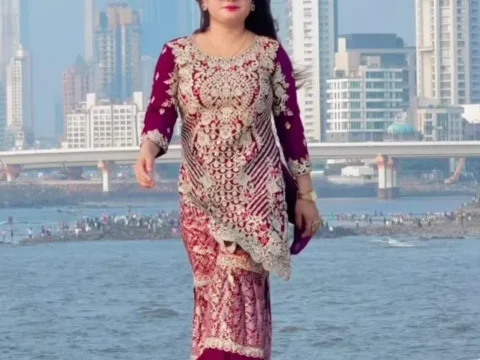
New Trending AI Photo Editing Prompts: Artificial intelligence has completely transformed the way people edit and create photos. Instead of spending hours learning professional editing software, anyone can now generate eye-catching and realistic images within minutes. Every week, new AI photo editing trends appear on social media, attracting millions of views and inspiring creators around the world.
Whether you want to create cinematic portraits, fantasy artwork, travel photos, or stylish social media pictures, AI image generators make the process fast and effortless. With the right prompt, you can turn an ordinary selfie into a professional-quality masterpiece.
In this guide, you’ll discover the latest trending AI photo editing prompts, learn how to use them effectively, and understand the easiest way to generate stunning AI images. We also share beginner-friendly tips so you can achieve better results without any editing experience.
Why AI Photo Editing Is Becoming So Popular
AI-powered image generation has become one of the biggest digital trends because it saves both time and effort. Modern AI tools understand detailed instructions and can transform a simple photo into an artistic, realistic, or cinematic image with incredible accuracy.
Unlike traditional photo editing, you don’t need expensive software or professional skills. Simply upload your image, enter a detailed prompt, and let the AI create the final result.
This technology is now widely used by content creators, influencers, bloggers, students, businesses, and social media users who want unique visuals that stand out online.
Latest Trending AI Photo Editing Prompts
The quality of an AI-generated image depends heavily on the prompt you use. A detailed prompt gives the AI better instructions, resulting in sharper details, natural lighting, realistic expressions, and professional compositions.
Popular prompt styles currently include:
- Cinematic movie posters
- Luxury lifestyle portraits
- Fantasy and magical scenes
- Anime-inspired artwork
- Royal king and queen portraits
- Traditional cultural photography
- Travel and adventure themes
- Rainy street photography
- Professional business portraits
- Neon cyberpunk effects
These trending prompt styles are gaining massive popularity because they produce visually impressive and highly shareable images.
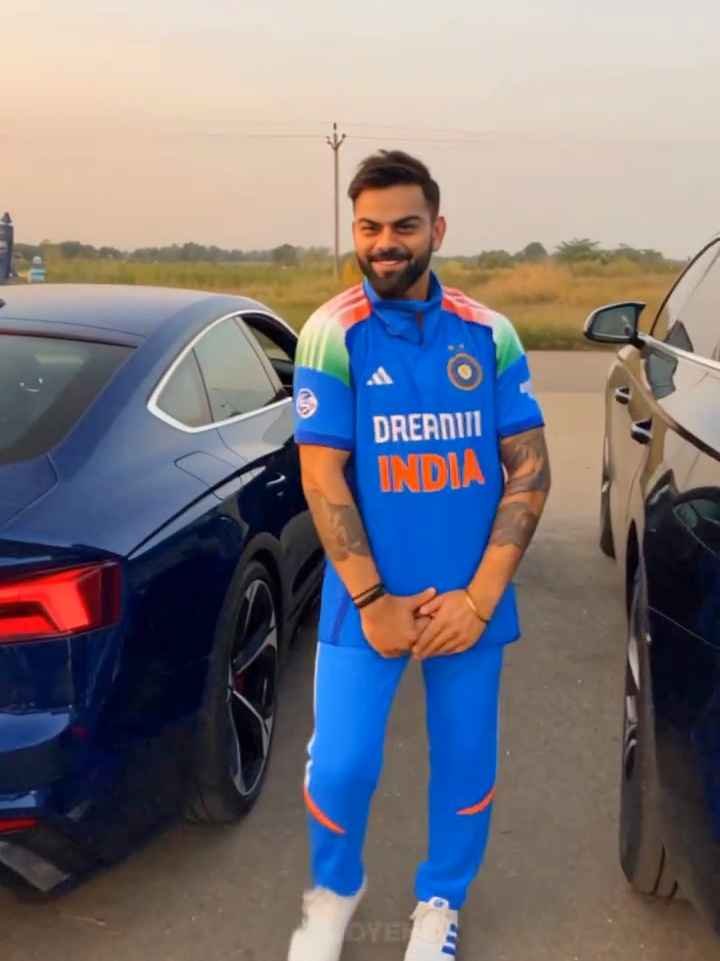
Use the uploaded reference video as the EXACT VIDEO REFERENCE. I will upload THREE separate reference images, one for each person: Reference Image 1 = PERSON 1, Reference Image 2 = PERSON 2, Reference Image 3 = PERSON 3. Create a new video that follows the uploaded reference video as closely as possible.
IMPORTANT — PRESERVE THE THREE PEOPLE: Use the three uploaded reference images as the identity source for the corresponding persons. Do NOT change, replace, merge, beautify, redesign, or reinterpret their faces. Keep each person's exact facial identity, face shape, hairstyle, hairline, skin tone, body proportions and overall appearance consistent with their reference image. Each person must remain clearly recognizable as the same person from their uploaded reference image.
REFERENCE VIDEO MATCH: Recreate the reference video's exact sequence of shots, timing and pacing, camera movement, camera distance, camera height, camera angle, framing, composition, subject positioning, walking and movement direction, hand gestures, head movements, body movements, facial expressions, interactions between people, transitions between shots and overall visual rhythm. Do NOT create a different interpretation of the scene. Do NOT add new actions. Do NOT remove actions. Do NOT rearrange the sequence. Follow the reference video's visual choreography and timing as closely as possible.
PERSON CONSISTENCY: When Person 1 appears, use ONLY Reference Image 1 as the identity reference. When Person 2 appears, use ONLY Reference Image 2 as the identity reference. When Person 3 appears, use ONLY Reference Image 3 as the identity reference. Do not accidentally swap identities between shots. Do not mix facial features between the three people. Do not generate generic replacement faces.
CAMERA: Match the reference video's handheld smartphone-camera feeling, perspective, camera height, lens look, framing, movement, push-ins, pull-backs, close-ups and wider shots as closely as possible. Preserve the same vertical 9:16 composition. MOTION: Reproduce the same natural human movements shown in the reference video. Keep movements realistic and physically consistent. No exaggerated AI movements. No robotic motion. No unnatural body deformation. Hands and fingers must remain anatomically correct.
VISUAL STYLE: Photorealistic live-action footage. Natural human skin texture. Realistic lighting and shadows. Realistic outdoor/environmental lighting. Natural motion blur. Natural depth of field. Real smartphone-camera image quality. No CGI. No 3D-rendered appearance. No cartoon look. No plastic AI skin. No artificial beauty filter.
ENVIRONMENT: Preserve and recreate the same environment, background arrangement, atmosphere, lighting conditions, perspective and overall visual mood visible in the reference video as closely as possible. Do not unnecessarily redesign or replace the environment.
IDENTITY LOCK: The reference images control WHO the people are. The reference video controls HOW they move, where they appear, the camera behavior, shot sequence, interactions and timing. Do not change the identity of any person just because the pose, camera angle, lighting or expression changes. FINAL OUTPUT: Generate one continuous vertical 9:16 photorealistic live-action video that closely reproduces the uploaded reference video with the three uploaded people replacing the corresponding people in the reference. The result should look like the same video was recreated with these three exact people, not like a new AI-generated interpretation. Maintain strict identity consistency throughout the entire video and preserve the reference video's choreography, timing, camera behavior, composition, movements and interactions as accurately as possible. NO TEXT. NO WATERMARK. NO LOGO. NO CAPTIONS
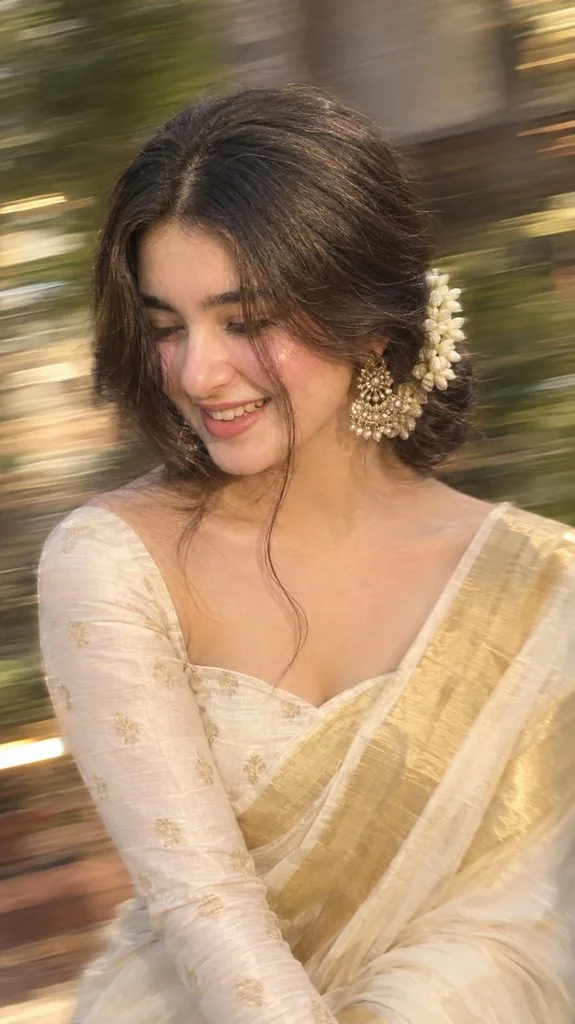
Without changing original face create an Intentional artistic motion-blur portrait, shot on a smartphone or long-exposure camera. Not so extreme close-up of a woman with a loose braided low bun and add jasmine flowers around her bun and a long face-framing strand covering half her face. She's wearing a onam saree with a matching full sleeve blouse with a sweetheart neck. Don't show the Cleavage. Looking down and to the side, one eye mostly hidden, lips slightly parted. Large statement gold earrings, bare shoulders, smooth glowing skin, soft peach blush, subtle highlighter, delicate makeup, defined lashes, matte dusty-rose lips with darker liner.Aspect ratio 9:16. The image should look very natural and the quality should be 4k.
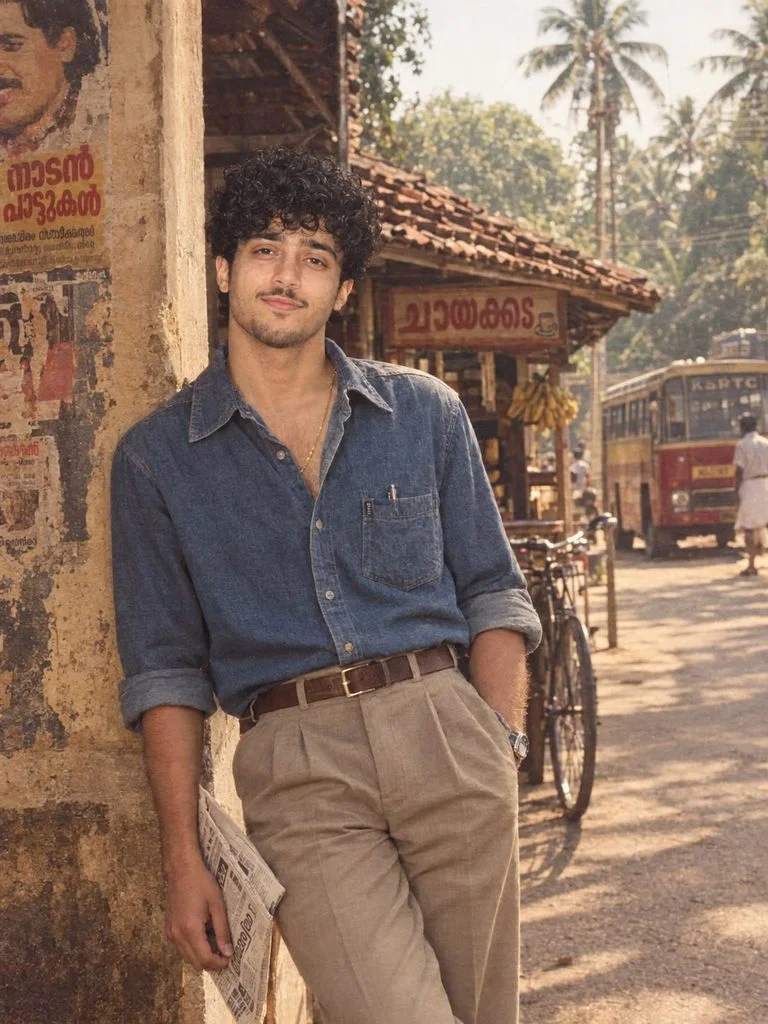
- retro denim
- classic leather belts
- polished shoes
- vintage sandals or loafers

The clothing must look *clearly and unmistakably 1980s at first glance*. Do not create a modern shirt-and-pants outfit and simply apply a vintage filter.

### Accessories

Add *authentic 1980s accessories* that fit the individual naturally.

Do not give every person the same accessories. Choose a different combination based on the outfit, face, pose, and mood.

Possible accessories include:

- aviator sunglasses
- vintage wristwatch
- leather belt
- subtle gold chain
- retro ring
- classic bracelet
- pen in shirt pocket
- vintage shoulder bag
- old-style leather wallet
- classic footwear

Accessories should strengthen the 80s feel without looking overcrowded or costume-like.

### Kerala background

Place him in an *authentic 1980s Kerala environment*.

Analyze the uploaded photo’s *pose, framing, expression, clothing colors, personality, and overall mood, then choose **one Kerala background that naturally matches that specific person*.

Do not default to the same Ambassador car, tea shop, or street for everyone.

Possible Kerala backgrounds include:

- old Kerala tiled-roof house veranda
- traditional Kerala house courtyard
- coconut-tree-lined village road
- old Kerala town street
- nostalgic chaaya kada exterior
- vintage bakery front
- old hotel or restaurant entrance
- textile shop lane
- old cinema theatre exterior
- street with hand-painted Malayalam movie posters
- vintage railway platform
- old Kerala bus stand
- backwater ferry jetty
- riverside walkway
- small Kerala market lane
- old college campus corridor
- vintage school courtyard
- heritage Kerala bungalow
- tiled corridor with arches
- monsoon Kerala street
- small-town shopping street
- coastal Kerala road
- old terrace or balcony
- vintage petrol pump
- bicycle repair shop
- small roadside provision store
- old barbershop exterior
- bus depot or transport yard
- village junction with old signboards

The background must vary naturally from person to person and should support the character’s pose and styling.

### Pose

Do not use the same pose for everyone.

Choose a pose that works naturally with the uploaded photo and selected background, such as:

- standing confidently
- leaning against a veranda pillar
- sitting casually on steps
- walking through a street
- standing near a shop entrance
- resting beside a wall
- looking away from the camera
- adjusting sunglasses
- one hand in pocket
- standing beside a bicycle or scooter when appropriate

The pose should feel like a real candid or portrait photograph from the 1980s.

### Overall visual style

Make the entire image feel like an *actual photograph taken in Kerala during the 1980s*, not a modern photoshoot with a retro filter.

Use:

- authentic 1980s styling
- warm analog film tones
- Kodachrome-inspired color rendering
- subtle vintage film grain
- soft highlights
- gentle contrast
- realistic natural skin texture
- slightly imperfect vintage photography
- believable period details
- realistic fabric textures
- natural cinematic lighting
- nostalgic Kerala atmosphere

*Every uploaded person must produce a noticeably different result*, including a different hairstyle, beard or moustache styling, sideburns, outfit combination, accessories, pose, and Kerala background.

The one thing that must remain consistent is the concept: *the same recognizable person authentically reimagined as a man living in Kerala in the 1980s.*

*Vertical 3:4, photorealistic, ultra-detailed, realistic human proportions, cinematic, authentic 1980s Indian fashion photography.*

### Negative prompt preserve original hairstyle, preserve exact original beard style, preserve exact original moustache, preserve original sideburn style, modern fade haircut, skin fade, undercut, modern barber cut, sharp beard line-up, boxed

beard, modern stubble, contemporary hairstyle, modern casual fashion, repeated shirt, repeated trousers, repeated hairstyle, repeated beard, repeated moustache, repeated sideburns, repeated accessories, repeated background, identical pose, default Ambassador car, smartphone, LED lighting, modern advertisements, modern vehicles, modern architecture, contemporary signage, plastic skin, excessive beauty retouching, CGI, cartoon, anime, distorted face, extra fingers, unrealistic body proportions.
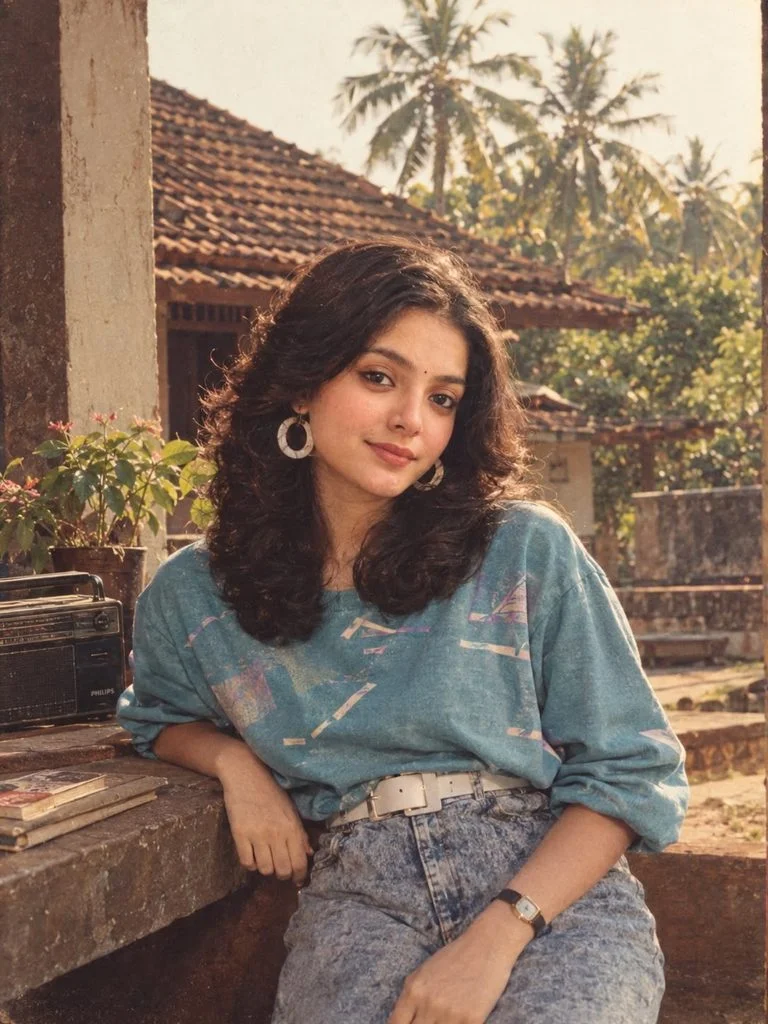
Create a *photorealistic 1980s retro picture* using the uploaded photo as the identity reference. Preserve her *face, facial features, skin tone, age, body proportions, and overall identity exactly*, so she is clearly recognizable as the same person.

*Do not preserve the hairstyle from the uploaded photo.* Completely restyle her hair into an authentic *1980s hairstyle* that naturally suits her individual face structure, face shape, forehead, jawline, hair length, hair density, and hair texture.

The hairstyle must look genuinely from the 1980s, not like a modern hairstyle with retro clothing.

*Choose the hairstyle individually for each person.* Do not use one fixed hairstyle for everyone. Depending on what suits her face best, dynamically select an era-appropriate hairstyle such as:

- voluminous natural curls
- feathered layered blowout
- soft 80s perm
- large bouncy waves
- teased crown with flowing hair
- side-swept voluminous hair
- high side ponytail
- retro half-up hairstyle
- crimped textured hair
- shoulder-length layered 80s cut
- fluffy rounded curls
- short voluminous retro cut
- loose curls with a scrunchie
- dramatic side-parted waves

*Do not randomly force a hairstyle.* First study her face structure and choose the 1980s hairstyle that makes her look most natural and flattering. Different uploaded faces should naturally produce different hairstyles.

Hair should have the *volume, texture, shape, layering, and styling characteristic of the 1980s*. Avoid modern straightened hair, curtain bangs, modern balayage, sleek contemporary blowouts, wolf cuts, modern beach waves, or current Instagram hairstyles.

### Fashion

Transform her clothing into a bold, stylish *1980s western retro outfit*.

*Do not use saree, kurti, salwar, lehenga, or traditional Indian clothing.*

Keep the *main color family and overall color mood of the clothes in the uploaded image*, but reinterpret them into authentic 1980s western fashion.

Do not copy one fixed outfit for every person. Choose a different combination depending on her body type, pose, colors, and personality. Possible authentic 80s elements include:

- acid-wash high-waisted jeans
- stone-wash denim
- tapered mom jeans
- high-waisted pleated trousers
- paper-bag waist pants
- retro skirts
- oversized tucked-in sweatshirts
- oversized graphic tops
- puff-sleeve tops
- batwing or dolman-sleeve tops
- colorful retro blouses
- off-shoulder 80s tops
- vintage denim jackets
- cropped retro jackets
- colorful coordinated sets
- authentic 80s jumpsuits

The outfit must be *obviously 1980s at first glance*. Do not create a modern jeans-and-top outfit and simply call it retro.

### Accessories

Choose accessories individually based on what suits the person and outfit. Vary them across generations. Possible accessories include:

- oversized hoop earrings
- colorful plastic bangles
- chunky retro earrings
- scrunchies
- colorful hair clips
- wide vintage belts
- classic wristwatches
- layered bracelets
- retro sunglasses
- small vintage handbags
- subtle 80s-style jewelry

Do not give every person the same hoops, bangles, belt, or scrunchie.

### Kerala Background

Place her in an *authentic Kerala environment*, creating a visual contrast between her stylish western 1980s fashion and the nostalgic Kerala surroundings.

Analyze the uploaded photo's pose, framing, expression, clothes, and mood and automatically choose *one Kerala background that fits naturally*.

Possible environments include:

- old Kerala tiled-roof house veranda
- traditional Kerala house courtyard
- coconut-tree-lined village road
- old Kerala town street
- nostalgic chaaya kada exterior
- vintage Kerala bakery
- old hotel or restaurant entrance
- 1980s textile shop street
- old cinema theatre exterior
- street with hand-painted Malayalam movie posters
- vintage Kerala railway platform
- old Kerala bus stand
- backwater ferry jetty
- riverside walkway
- small Kerala market lane
- old college campus corridor
-

vintage school or college courtyard
- heritage Kerala bungalow - old tiled corridor with arches
- monsoon Kerala street
- small-town shopping street
- coastal Kerala road
- old terrace or balcony of a Kerala home

*Do not automatically use the same background for everyone.* Do not default to an Ambassador car, tea shop, railway station, or any other single location. The background must change according to the individual uploaded photo.

Also vary the *pose and interaction with the environment* naturally. She may stand casually, lean against a wall, sit on steps, walk through a street, stand beside a shop, rest against a veranda pillar, look back at the camera, or pose naturally according to the original photo.

### Overall visual style

Make the entire image feel like an *actual photograph taken in Kerala during the 1980s*, not a modern photoshoot with a retro filter.

Use authentic 1980s photographic characteristics:

warm analog film tones, subtle Kodachrome-inspired colors, slight film grain, soft highlights, gentle contrast, natural skin texture, slightly imperfect vintage photography, nostalgic Kerala atmosphere, cinematic natural light, realistic fabric texture, and believable period details.

*Every uploaded above person must result in a noticeably different image, including a different hairstyle, outfit combination, accessories, pose, and Kerala environment, while maintaining the same overall concept of **1980s western retro girl fashion in Kerala*.

*3:4 ratio • photorealistic • cinematic • authentic 1980s fashion photography • realistic human proportions • high detail*

### Negative prompt

> preserve current hairstyle, modern hairstyle, sleek modern hair, curtain bangs, modern balayage, wolf cut, modern beach waves, modern jeans styling, skinny jeans, basic contemporary top, modern crop top, minimalist modern outfit, saree, kurti, salwar, lehenga, repeated hairstyle, repeated costume, repeated accessories, repeated background, identical pose, default Ambassador car, smartphone, LED lighting, contemporary advertisements, modern cars, modern architecture, plastic skin, CGI, cartoon, anime, distorted face, extra fingers, unrealistic body proportions.
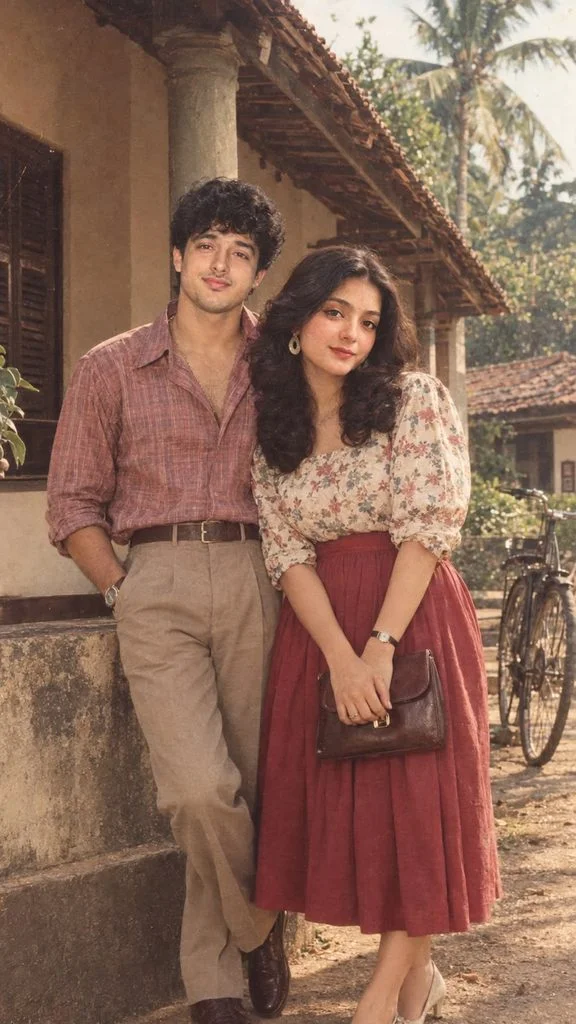
Create a photorealistic 1980s Indian retro family portrait using the uploaded photo(s) as the identity reference for all the
persons
Preserve both individuals’ faces, facial features, skin tones, ages, body proportions, natural expressions, and overall
identities exactly, so they are clearly recognizable as the same two people.
Do not preserve their current hairstyles, beard/moustache styles, clothing, accessories, pose, or background.
Completely restyle them into an authentic 1980s Kerala setting and fashion aesthetic.
HAIR & GROOMING — WOMAN:
Completely transform her hairstyle into a naturally authentic 1980s Indian/Kerala women’s hairstyle, chosen specifically
for her face shape, forehead, hair texture, density, age, and personality.
Possible styles include:
- voluminous side-parted hair
- softly feathered layers
- large natural waves
- shoulder-length layered hair
- puffed front with flowing hair
- classic 1980s brushed hairstyle
- long wavy hair with natural volume
- traditional Kerala-inspired vintage styling
Do not simply copy the modern hairstyle and add volume. The hairstyle must be visibly transformed into a genuine
1980s style while remaining natural and flattering.
HAIR & GROOMING — MAN:
Give him a distinctly 1980s men’s hairstyle that naturally suits his face shape, forehead, hair density, texture, age, and
personality.
Possible styles include:
- thick side-parted retro hair
- feathered layered hair
- softly wavy brushed-back hair
- voluminous side-combed hair
- fuller top with side volume
- slightly long layered 80s hair
- classic neatly combed retro cut
- puffed-front styling
BEARD, MOUSTACHE & SIDEBURNS:
Preserve each person’s natural beard/moustache status from the reference.
If the man has a beard, keep him bearded but transform it into an authentic 1980s beard style with natural fullness and
period-appropriate sideburns.
If he has a moustache, retain it while restyling its thickness and shape into a believable 1980s moustache.
If he is clean-shaven, do not automatically add a full beard. Use an appropriate retro moustache, sideburns, or
clean-shaven 1980s grooming.
Avoid modern fades, skin fades, undercuts, sharp barber line-ups, boxed beards, modern stubble shaping, or
contemporary social-media barber trends.
COUPLE CLOTHING:
Completely redesign both outfits into authentic 1980s Indian/Kerala fashion.
The outfits should complement each other naturally without looking like matching costumes.
For the woman, choose an authentic 1980s style such as:
- vintage printed blouse and high-waisted skirt
- elegant Kerala-style saree with period-appropriate blouse
- floral blouse with pleated skirt
- vintage salwar suit
- simple cotton saree
- retro patterned dress
For the man, choose a different complementary 1980s outfit such as:
- wide-collar tucked-in shirt with high-waisted trousers
- striped or checkered shirt
- safari shirt
- printed retro shirt
- rolled-sleeve shirt
- knitted polo
- vintage trousers with leather belt
- denim jacket with retro trousers
Keep the main color family and overall color mood from the uploaded reference image, while making the clothing
unmistakably 1980s.
Do not give every couple the same clothing combination.
ACCESSORIES:
Add subtle, authentic 1980s accessories individually selected for each person.
Examples:
- vintage wristwatch
- aviator sunglasses
- classic gold chain
- simple earrings
- vintage bracelet
- leather belt
- retro ring
- classic handbag
- vintage shoulder bag
- classic period-appropriate footwear
Avoid excessive accessories.
KERALA 1980s BACKGROUND:
Place the couple in one authentic 1980s Kerala environment that naturally fits their personalities, clothing, pose, and
mood.
Choose one suitable background such as:
- traditional Kerala tiled-roof house veranda
- heritage Kerala bungalow
- coconut-tree-lined village road
- old Kerala town street
- vintage bakery
- nostalgic chaaya kada
- old cinema theatre with Malayalam posters
- Kerala railway platform
- old bus stand
- backwater ferry jetty
- riverside walkway
- small Kerala market
- old college campus
- vintage school courtyard
- monsoon street
- old textile shop
- coastal Kerala road
- traditional courtyard
- old hotel entrance
- vintage petrol pump
Include believable period details such as old Malayalam signboards, vintage bicycles, old buses, period architecture,
analog advertisements, tiled roofs, coconut trees, and natural Kerala surroundings.
No modern cars, smartphones, LED signs, contemporary buildings, or modern advertisements.
COUPLE POSE & INTERACTION:
Create a natural 1980s couple photograph, not a modern couple photoshoot.
Choose a pose that feels spontaneous and period-authentic, such as:
- standing together outside a Kerala house
- sitting together on veranda steps
- walking side-by-side on a village road
- standing close beside a tiled-roof house
- casually leaning against a veranda pillar
- sitting together at a tea shop
- standing near a vintage bicycle
- walking through an old Kerala market
- one person looking at the camera while the other looks at them
- subtle affectionate interaction
- holding hands naturally
- standing shoulder-to-shoulder in a classic portrait
Their body language should feel natural, comfortable, affectionate, and believable, without exaggerated romantic
posing.
Both people must have natural human proportions and realistic physical interaction.
OVERALL PHOTOGRAPHY STYLE:
Make the final image look like a real photograph actually taken in Kerala during the 1980s, NOT a modern photograph
with a vintage filter.
Use:
- authentic 1980s Indian fashion photography
- warm analog film tones
- Kodachrome-inspired color rendering
- subtle vintage film grain
- slightly faded colors
- soft highlights
- gentle contrast
- realistic natural skin texture
- natural imperfections
- realistic fabric textures
- period-accurate lighting
- natural Kerala sunlight
- subtle film-camera softness
- nostalgic cinematic atmosphere
- believable 1980s photographic imperfections
The couple should look like two real people who actually lived in Kerala during the 1980s, rather than actors wearing
retro costumes.
IMPORTANT COUPLE RULE:
Do not make the two people look like generic models.
Their identities must remain recognizable.
Each person must receive a different hairstyle, grooming style, outfit details, accessories, and natural body language,
while the two looks should still feel visually cohesive as a couple.
If multiple couple photos are generated, vary the hairstyle, clothing combination, pose, accessories, and Kerala location
between generations rather than repeating the same setup.
COMPOSITION:
Vertical 9:16.
Photorealistic, ultra-detailed, realistic human proportions, authentic Indian facial features, natural skin texture, cinematic
1980s film photography, nostalgic Kerala atmosphere, full-body or three-quarter couple portrait, natural depth of field,
authentic analog photograph.
NEGATIVE PROMPT:
preserve modern hairstyle, preserve current hairstyle, preserve modern clothing, modern fashion, modern couple
photoshoot, modern beard, modern moustache, modern fade, skin fade, undercut, sharp beard line-up, boxed beard,
contemporary stubble, modern barber styling, smartphones, modern cars, modern buildings, LED lighting, modern
advertisements, modern Malayalam signage, contemporary architecture, identical hairstyles, identical outfits, identical
accessories, identical poses, generic faces, altered identity, different facial features, face distortion, face swap, plastic
skin, excessive beauty retouching, CGI, cartoon, anime, artificial skin, extra fingers, missing fingers, malformed hands,
unnatural body proportions, duplicated people, extra person, fused bodies, unnatural touching, distorted eyes, distorted
teeth, overly romantic pose, wedding photography, modern studio photography, default Ambassador car, overly clean
digital image.
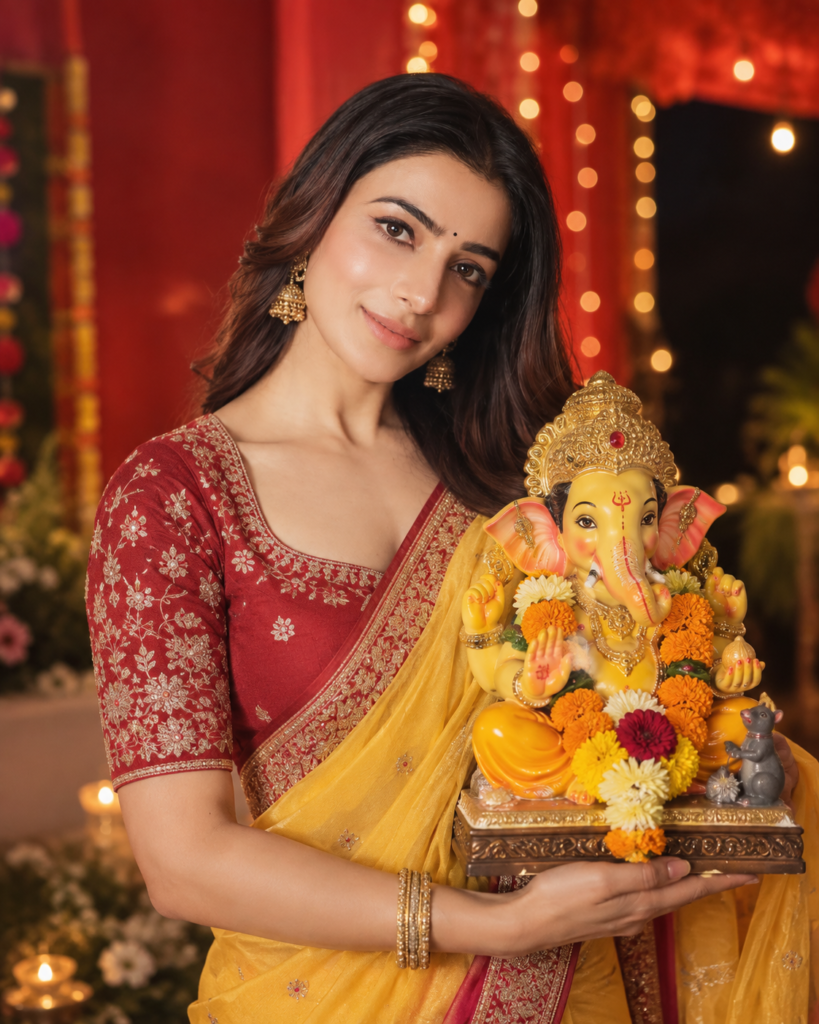
A medium close-up, high-definition photograph of a smiling young Indian woman with long, curly dark hair, wearing a red embroidered blouse, a yellow saree with a red border, and ornate gold jewelry, holding an adorned Lord Ganesha idol. The idol is yellow, decorated with a gold crown, flower garlands, and a small mouse figure. The background is a blurred red and black gradient with bokeh lights, creating a warm, festive atmosphere. Shot at eye level with soft, natural lighting Aspect Ratio: 4:5. I will attach my photo to generate and design image. It should not look like AI-generated, it should looks natural — for a photographic image, like it was taken with an iPhone 16 camera. Generate image now.
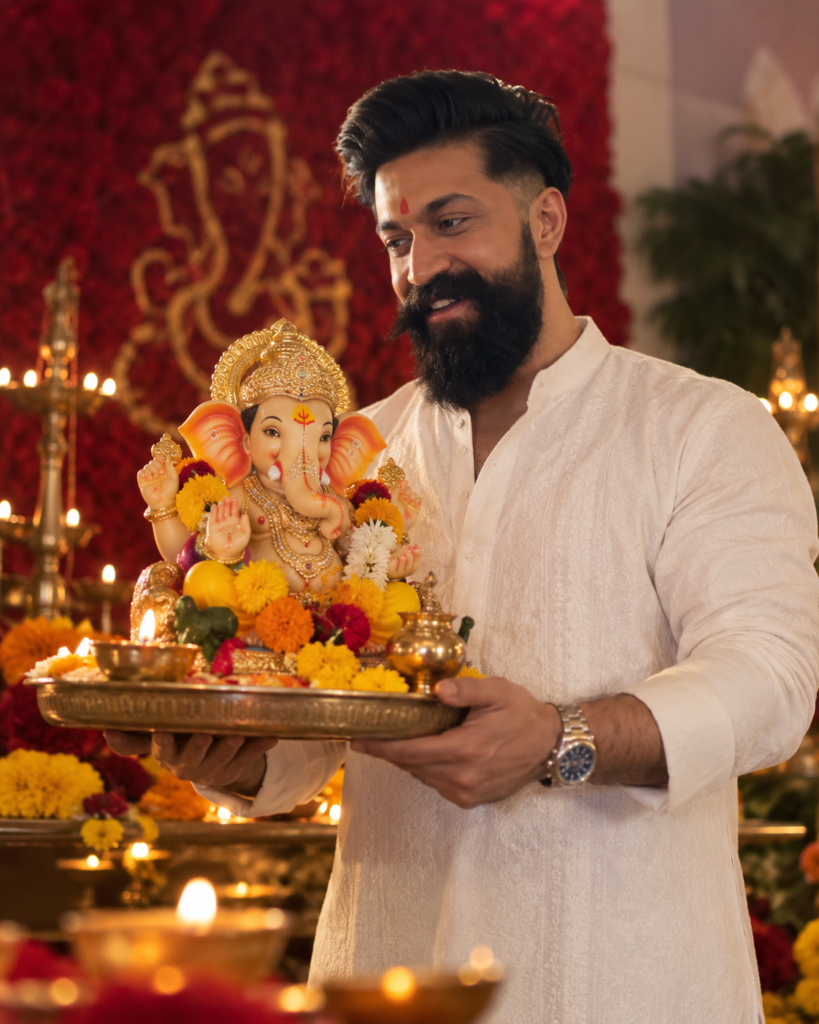
A high-resolution, candid photograph capturing a joyful young Indian man with a beard and a red bindi, wearing a crisp white kurta, smiling and holding a decorative Ganesha idol adorned with gold jewelry and marigold flowers. The idol is placed on a traditional metal tray with lamps. The background is a warm, celebratory setting with a blurred deep red backdrop and glowing diyas, creating a spiritual atmosphere. Warm, soft lighting from the side highlights the man's expression and the intricate details of the deity. Shot at eye level with a medium depth of field Aspect Ratio: 4:5. I will attach my photo to generate and design image. It should not look like AI-generated, it should looks natural — for a photographic image, like it was taken with an iPhone 16 camera. Generate image now.
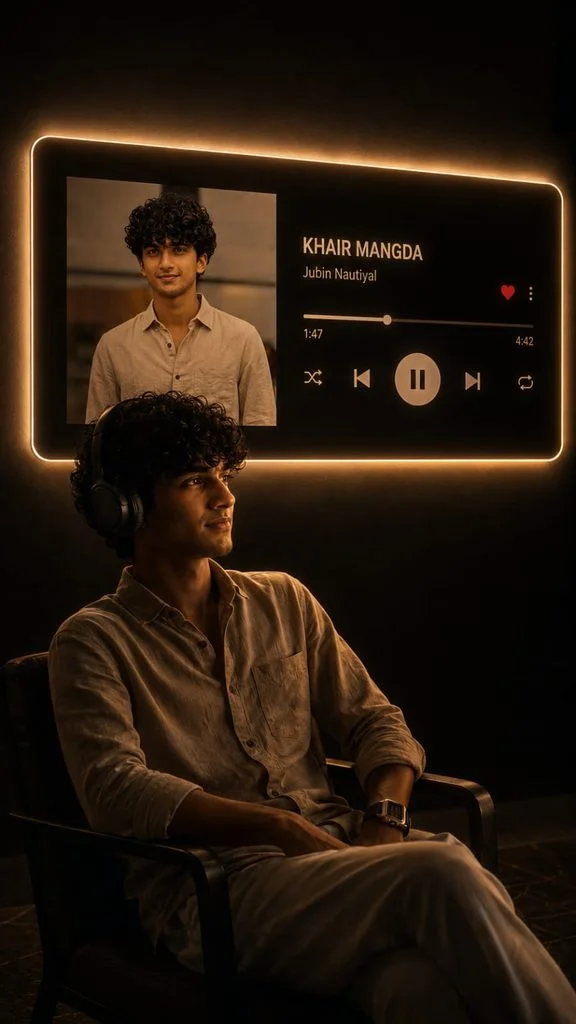
Transform my uploaded photo into a cinematic 9:16 vertical portrait inspired by a dark aesthetic music-listening scene.

Keep the exact same person from my uploaded photo — preserve their identity, face, facial features, hairstyle, skin tone, body proportions and clothing. Do not replace or redesign the person.

Place the person sitting naturally on a simple chair in a dark, minimal room, shown mostly as a dramatic silhouette from a side/three-quarter angle. Keep the pose realistic and elegant, with subtle rim lighting outlining the body and hair.

On the wall behind the person, create a large futuristic music-player panel with a soft warm white/golden neon glow around its edges. Inside the panel, show the uploaded/selected album artwork on the left and a realistic modern music-player interface on the right with:
Song: [SONG NAME]
Artist: [ARTIST NAME]
A progress bar, heart icon, menu icon, shuffle, previous, large pause/play button, next and repeat icons.

Make the music-player panel look physically mounted on the wall with realistic glow and light spill onto the room. Keep the background almost completely dark, with subtle shadows and reflections on the floor.

Use realistic photography, cinematic low-key lighting, warm ambient glow, deep blacks, soft shadows, realistic skin texture, natural proportions, subtle film grain, premium editorial aesthetic, high detail, photorealistic, dramatic composition.

Aspect ratio: 9:16 vertical.
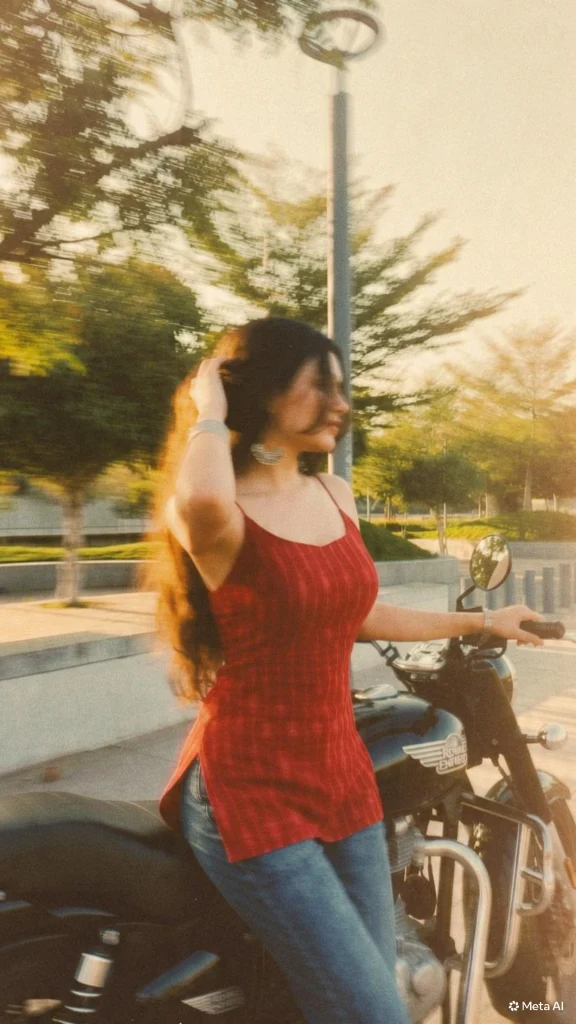
Add strong realistic long-exposure across the entire subject as if captured while moving, vintage film aesthetic, natural lighting, land unchanged facia eatures
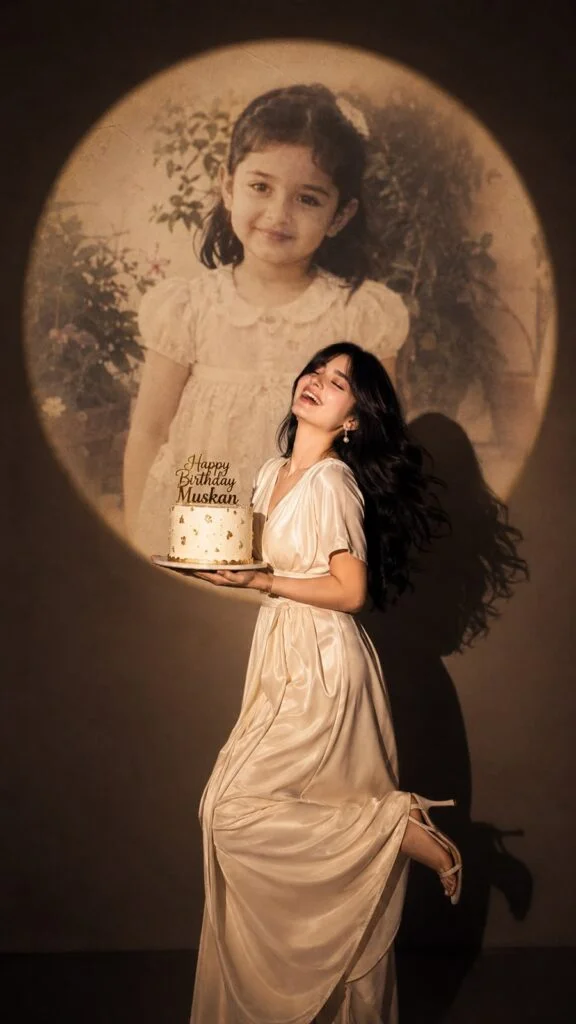
Create ultra-realistic cinematic birthday photoshoot, vertical 9:16 composition, elegant studio with a dark background and a large circular spotlight projection on the wall. Inside the spotlight, a faded vintage childhood photo of the same girl(the reference image 2nd given)appears as a nostalgic memory, slightly transparent with old photo texture and soft blur. In the foreground, the present-day version of the same woman(the reference image 1st given) wearing a cream long gown, holding a white birthday cake decorated with gold accents with a “Happy Birthday "name” topper. She is laughing joyfully with her head tilted back, eyes closed, natural smile, long silky dark hair flowing behind her, one leg slightly raised in an elegant pose, cinematic shadow cast on the wall, warm soft spotlight lighting.
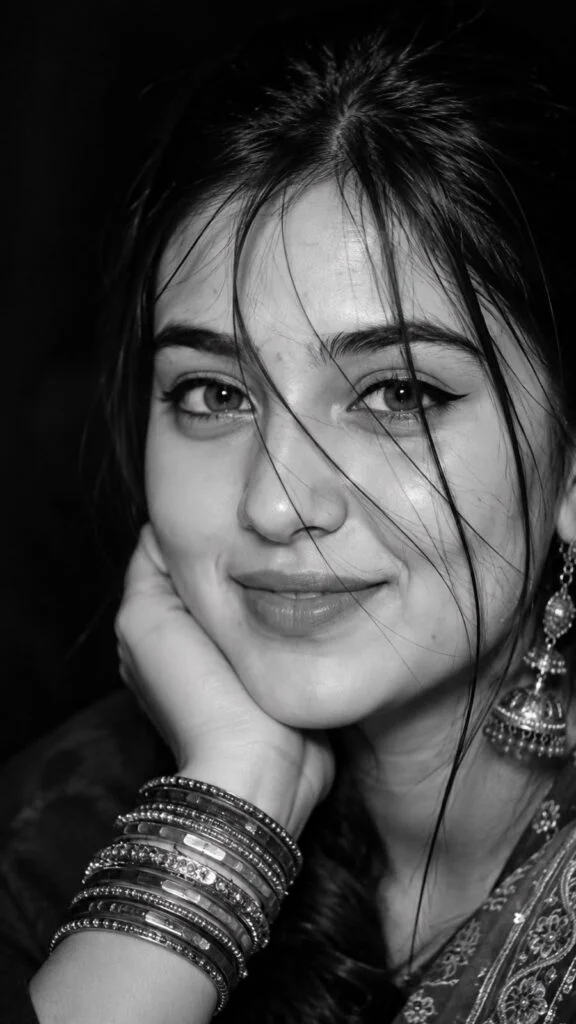
Ultra-realistic black-and-white close-up portrait in 9:16 vertical ratio, cinematic editorial photography. The frame captures only the right half of a young South Asian woman’s face, filling most of the composition. She rests her cheek gently on her bent hand with her wrist supporting her face, creating a soft relaxed pose.
She wears a subtle closed-lip smile with a tiny cheek dimple, expressive almond-shaped dark eyes looking directly into the camera, bold black winged eyeliner, thick naturally shaped eyebrows, soft matte lips, smooth natural skin with visible pores and realistic texture.
Several loose wispy strands of dark hair fall naturally across her forehead, eye, cheek, and lips, adding depth and an effortless candid feel. Long dark hair is tied back with only a few strands framing the face.
She wears an ornate long silver oxidized tassel jhumka earring hanging beside her cheek and multiple stacked traditional bangles covering most of her wrist. A richly embroidered traditional outfit is barely visible near the bottom corner.
Lighting resembles direct smartphone flash photography with soft shadows, creating bright highlights on the nose, cheeks, forehead, lips, and jewelry. High dynamic range with authentic flash reflections, subtle film grain, slight vintage texture, monochrome grayscale conversion, deep blacks, soft contrast, and crisp facial details.
The composition is extremely tight, with part of the face intentionally cropped, emphasizing the eye, smile, and flowing hair strands. Background is completely dark and out of focus, creating strong subject separation.
Photography style: ultra-photorealistic, DSLR quality, 85mm portrait lens, f/1.8, shallow depth of field, editorial beauty portrait, candid close-up, premium monochrome photography, natural imperfections, realistic skin microtexture, authentic flash aesthetic, 8K resolution.
Aspect Ratio: 9:16
Negative Prompt:
low quality, blurry, overexposed, oversaturated, AI face, plastic skin, beauty filter, excessive skin smoothing, asymmetrical eyes, distorted anatomy, duplicate earrings, extra fingers, extra jewelry, warped hand, cartoon, painting, CGI, low-resolution, unrealistic hair, glowing skin, exaggerated makeup, open mouth, teeth showing, background objects, color image, watermark, text, logo. Take her almost full face .
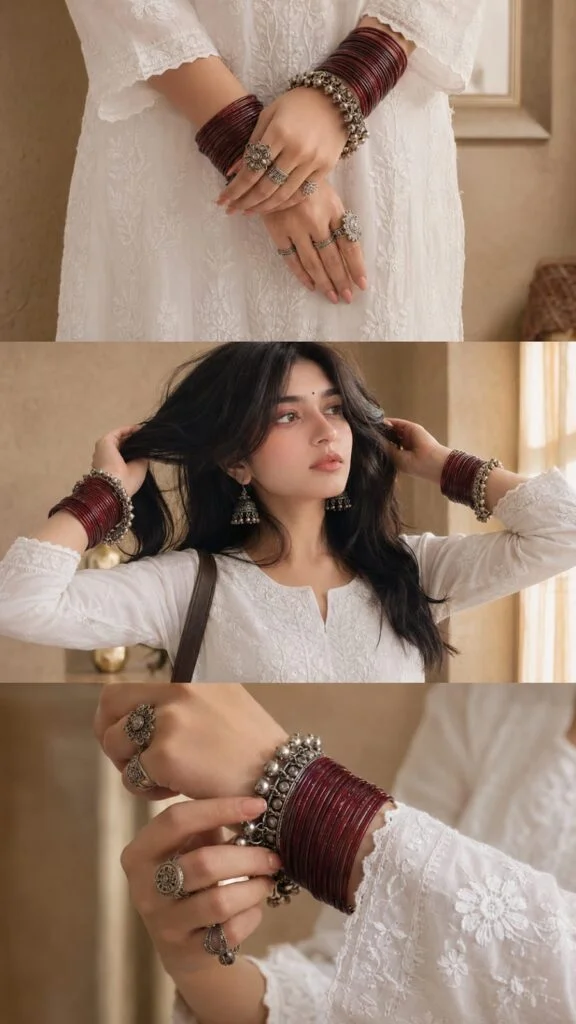
Create an ultra-realistic three-panel vertical editorial collage with seamless horizontal divisions, warm indoor lighting, and a luxury Pinterest aesthetic. The entire collage should feature the same young South Asian woman wearing a white chikankari embroidered cotton kurta with full sleeves and a round neckline with a small front slit. The background is a soft beige luxury interior with textured walls and warm natural window light.
Top Panel (Close-up Hands)
A close-up of both hands gently folded in front of the body at waist level. The woman wears deep maroon traditional glass bangles stacked from the wrists to halfway up the forearms on both hands. Over the bangles are oxidized silver gungroo bangles (payal-style bracelets) with tiny dangling bells. She wears multiple antique oxidized silver rings with intricate floral and circular designs on several fingers. Her nails are neatly manicured in a soft nude-pink shade. The white chikankari embroidery should be highly visible with realistic fabric texture and delicate floral threadwork.
Middle Panel (Upper Body Portrait)
A mid-shot showing the woman from chest to head 'her full upper body & face. She has long dark hair, loosely wavy with a few sleek strands falling across the front. She is gently lifting her long straight black hair back with both hands. Makeup is soft and glowy with prominent rosy blush and matching nude lips. She wears medium sized antique oxidized silver jhumka earrings with detailed carvings. The maroon glass bangles and silver ghungroo bracelets remain clearly visible. A dark brown leather shoulder bag hangs naturally from her right shoulder. Her lips have muted brown nude lipstick. The white chikankari kurta displays intricate embroidery across the chest. Add a very small black bindi on her forehead. Warm soft window light creates subtle shadows and a cozy indoor atmosphere.
Bottom Panel (Wrist Detail)
A close-up focusing on the left wrist while the right hand gently adjusts the silver hungroo bracelet. The maroon glass bangles dominate the frame with rich glossy reflections. The oxidized silver bracelet features numerous tiny ghungroo bells and engraved detailing.
Fingers display matching antique silver rings. The sleeve embroidery remains sharply detailed. Background softly blurred with warm beige tones.
Photography Style

Ultra photorealistic fashion editorial

Pinterest luxury ethnic aesthetic

Warm golden indoor ambient lighting

Soft natural window light

Neutral beige color palette

High dynamic range

Premium DSLR photography


85mm portrait lens

f/2.0 shallow depth of field

Realistic skin texture

Natural fabric folds

Crisp embroidery details

Sharp metallic reflections on jewelry

Premium lifestyle magazine quality

Minimalistic composition

Clean luxury interior

8K UHD

Hyper-detailed

No text

No watermark

No logos

Perfectly aligned three-panel collage

Elegant, timeless Indian ethnic fashion aesthetic.
Aspect ratio 9:16.
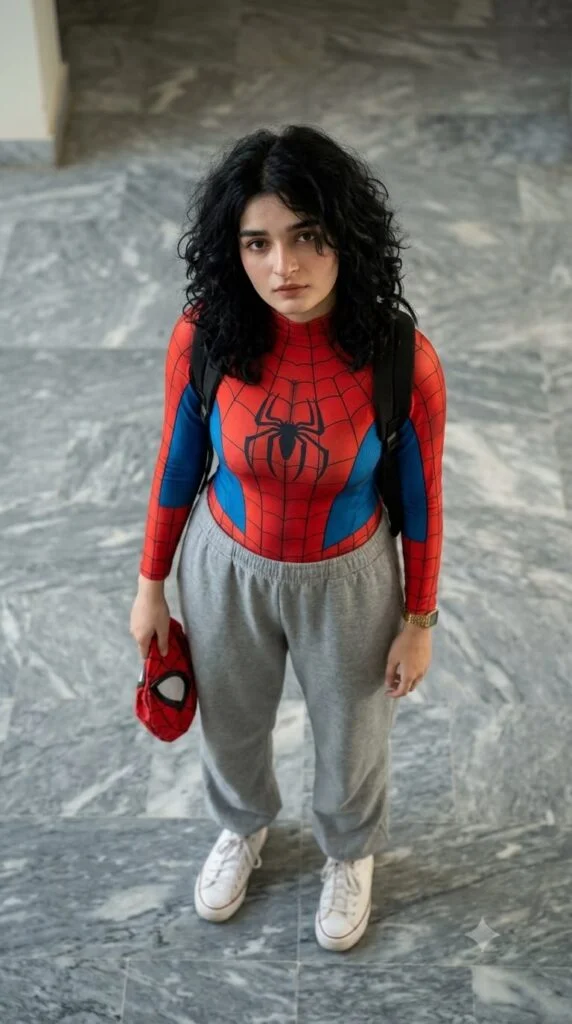
Ultra-realistic cinematic portrait of a young South Asian woman standing indoors on a polished gray marble floor, viewed from a high-angle top-down perspective as if photographed from an upper floor. She is looking directly into the camera with a warm, gentle smile and expressive dark brown eyes. She has shoulder-length wavy light-brown hair with a center part, natural glowing skin, subtle makeup, and small silver hoop earrings. She is wearing a fitted red-and-blue Spider-Man-inspired compression top with a realistic web pattern and spider emblem, light gray oversized jogger sweatpants with drawstrings, clean white sneakers, and a black backpack over both shoulders. In her right hand, she is casually holding a red Spider-Man mask. The setting is a modern indoor lobby with large polished marble tiles, soft ambient lighting, and a clean minimalist background. The composition is centered with full-body framing, natural body proportions, realistic textures, soft cinematic color grading, shallow depth of field, ultra-detailed skin, sharp facial focus, 85mm lens look, HDR, photorealistic, high dynamic range, premium DSLR quality, 8K, highly detailed, Instagram lifestyle photography, natural lighting, editorial fashion style, no watermark, no text.
Negative Prompt:
low quality, blurry, deformed face, extra fingers, bad anatomy, duplicate limbs, cartoon, CGI, oversaturated, noisy, watermark, logo, text, cropped feet, distorted eyes, unrealistic skin, low resolution, artifacts.
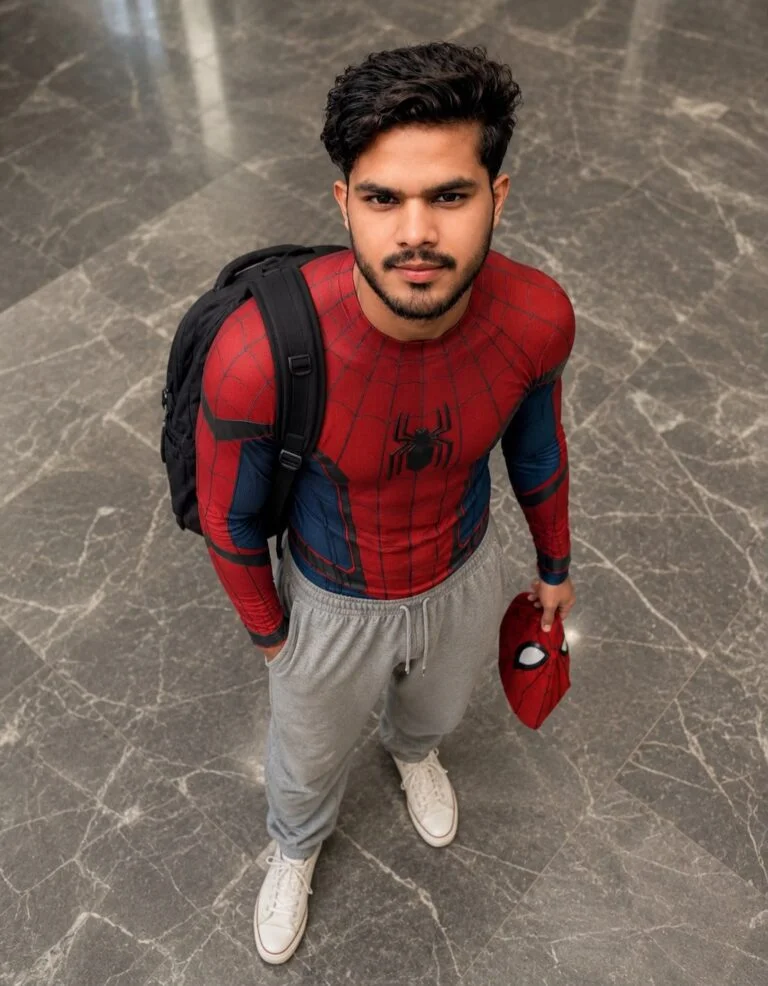
"A realistic high-angle full body shot of a young men with messy, textured black hair looking up at the camera. He is dressed in red and blue spider man bodysuit on his upper half, but wearing loose casual grey sweatpants on his lower half, white clean canvas shoes. He has black backpack on his shoulder and is holding red spider man mask in his left hand. he is standing indoors on a grey marbke tiled floor. The lighting is soft and natural. giving a casual " Peter Parker after school" Vibe."
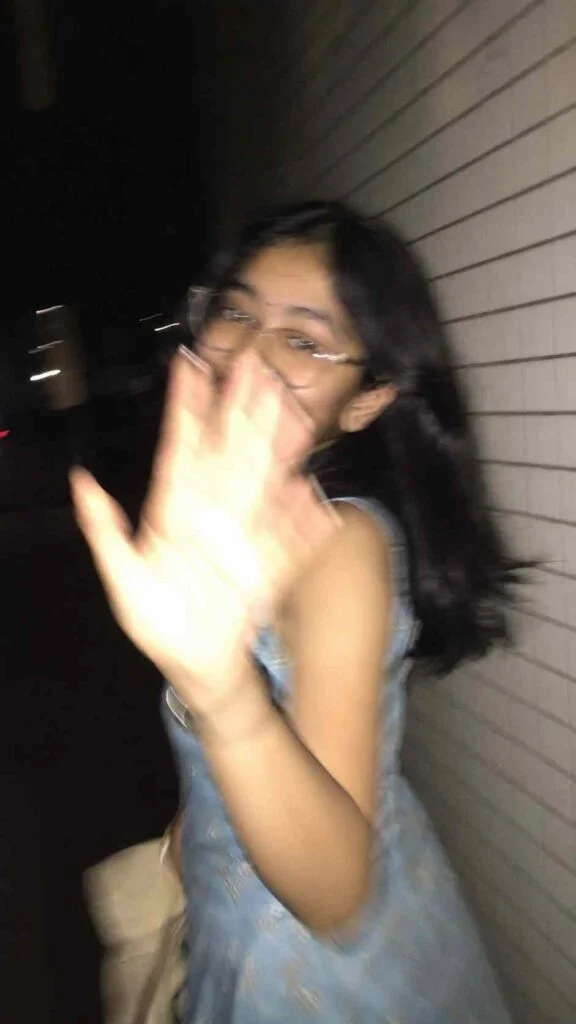
Ultra-realistic candid smartphone photograph, 9:16 vertical.
Use the attached image only as a strong visual inspiration for general facial proportions and vibe, while ensuring the generated subject remains fully original, non-identifiable, and not a face copy.
Scene
Nighttime on a quiet Tokyo city sidewalk beside a building with white ceramic tile walls.
The subject is walking past the camera, partially side-on, captured mid-step in a rushed, accidental moment.
Poses & Gestures (combined naturally)
The subject reacts instinctively to being photographed: turning her head back mid-walk as if surprised,
raising one hand close to the lens to partially block the camera, shy, restrained smile forming as she suppresses laughter, body angled in half-profile while continuing to walk forward, motion carries her slightly out of frame, imperfect framing.
Expressions are subtle and spontaneous — embarrassed, playful, fleeting — never posed.
Camera & Motion
Shot on a modern smartphone, handheld, rushed capture. Strong uncontrolled camera shake. Heavy directional motion blur across the raised hand, hair, and face. Facial features appear smeared and streaked by movement, faintly recognizable but distorted. Partial ghosting around the body. Imperfect framing, subject nearly leaving the frame.
Lighting
Flash-only lighting fired mid-motion. Harsh flash highlights on skin and hand. Deep surrounding darkness.
Uneven exposure, blown highlights, hard shadows typical of hurried night phone photography.
Background
White ceramic tile wall stretches into streaked light bands due to motion blur. Street surroundings fade into darkness with minimal readable detail.
Mood
Candid, shy, slightly playful. Feels intrusive, raw, imperfect, and authentic - like a fleeting memory accidentally captured and never meant to be perfect.
Image Quality
Extremely noisy. Heavily blurred. Raw smartphone look. Not cinematic. Not editorial. Not polished.
Negative Prompt
anime, illustration, painting, stylized, studio lighting, beauty lighting, soft portrait, sharp focus, clean face, perfect anatomy, smooth skin, fashion editorial, posed portrait, cinematic grading, film still, tripod shot, professional photography, identity match, face copy, real person replication.
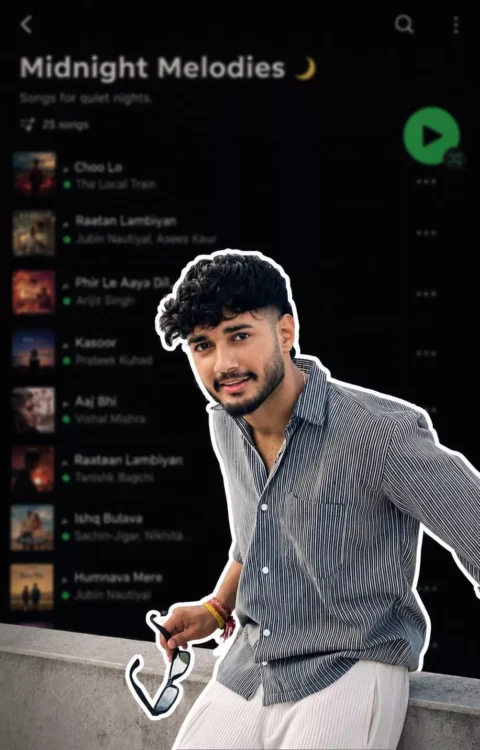
Use the uploaded reference image as the exact reference. Preserve the person's identity, facial features, skin tone, hairstyle, pose, expression, and body proportions exactly as shown. Keep the clothing 100% identical to the reference image. Do not change the outfit, colors, patterns, fabric, accessories, or fit. Preserve every detail of the original clothing exactly as in the uploaded image.
Create a premium digital collage style portrait. Cut out the subject with a thick white sticker-like outline, giving it a modern editorial collage look. Keep the pose natural and relaxed, with the person looking slightly downward with a calm, confident expression. If the reference image includes a hand near the face or clothing, preserve that naturally.
The background should be a heavily blurred dark-mode mobile music streaming app playlist, creating a stylish and modern aesthetic while keeping the focus entirely on the subject. Use soft ambient lighting, clean shadows, premium cinematic color grading, subtle film grain, high contrast, realistic skin texture, ultra-sharp details, HDR quality, and a minimal editorial design.
Ensure the face remains 100% recognizable and matches the uploaded reference perfectly. Do not alter the hairstyle, facial features, outfit, accessories, or overall appearance. The only transformation should be the digital collage effect, thick white sticker outline, and the blurred playlist background.
Ultra-realistic, Instagram aesthetic, premium graphic design, editorial quality, realistic depth of field, clean composition, 4K, HDR, vertical 4:5 aspect ratio.
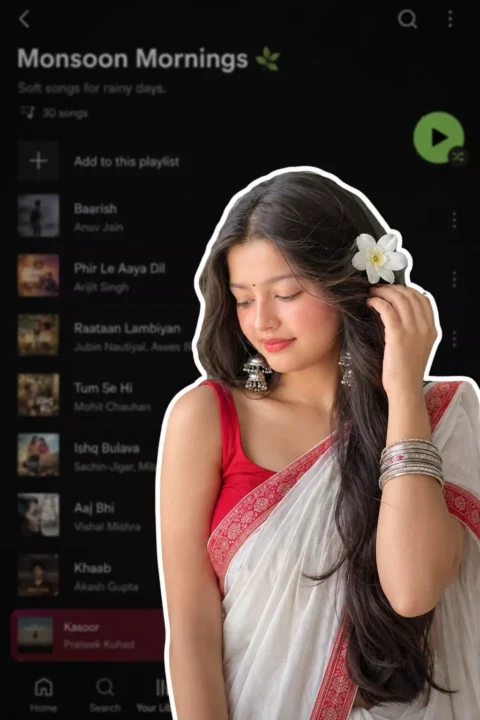
A digital collage style image. In the foreground, a young South Asian woman is cut out with a thick white sticker-like outline. She is wearing a traditional white saree with a red border, a red blouse, and silver bangles, with a white flower tucked into her long dark hair. She is looking downwards with a soft, serene expression, gently touching her hair near her ear. The background is a heavily blurred, dark-mode screenshot of a mobile music streaming app playlist.
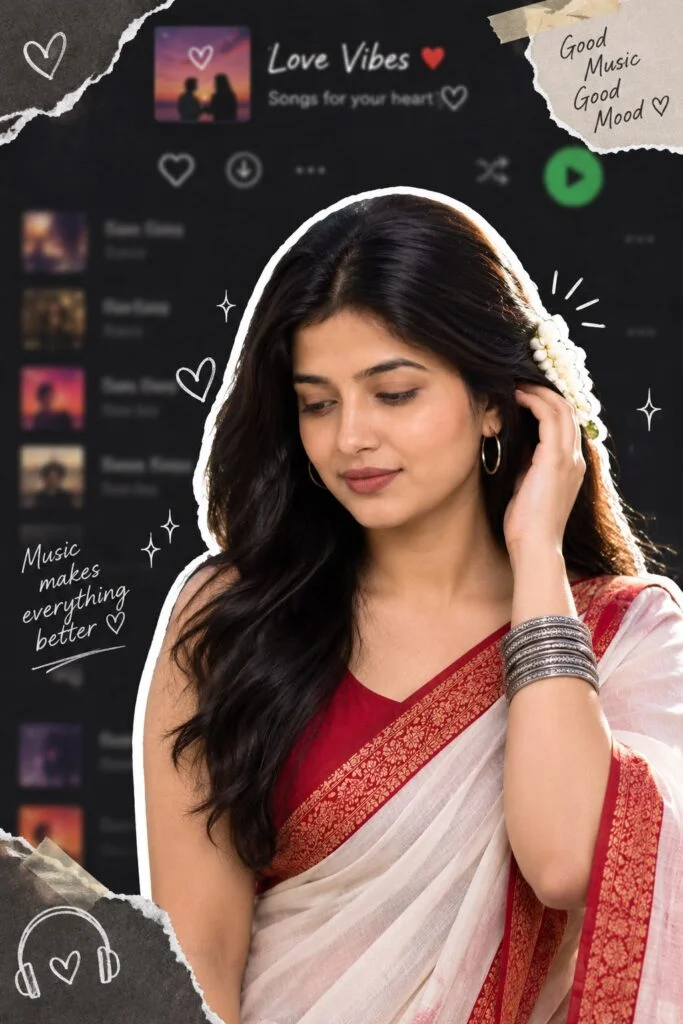
Here's a more aesthetic, premium-quality version of your prompt with stronger visual direction and a modern editorial feel:

> Create an ultra-aesthetic digital collage portrait featuring a beautiful young South Asian woman as the main subject. She is precisely cut out with a bold, thick white sticker-style outline, creating a layered scrapbook effect. She wears an elegant white saree with a rich red border, a matching deep red blouse, delicate silver bangles, and fresh white jasmine flowers woven into her long, flowing black hair. She gently looks downward with a calm, graceful expression while softly tucking a strand of hair behind her ear, radiating serenity and timeless beauty.

The background is a heavily blurred dark-mode mobile music streaming app playlist interface, creating a dreamy, nostalgic atmosphere without readable text. Blend subtle torn-paper textures, soft grain, paper cutouts, masking tape accents, tiny white doodles, sparkles, and minimalist graphic elements around the subject for a modern Pinterest/Y2K scrapbook aesthetic. Add soft white glow, gentle drop shadows, and realistic layered depth so the subject appears lifted from the background.

Use a sophisticated color palette of deep charcoal black, muted gray, crisp white, and rich crimson red. Enhance the mood with cinematic soft lighting, diffused highlights, smooth skin tones, natural shadows, shallow depth of field, subtle film grain, and premium editorial styling. The composition should feel clean, balanced, luxurious, emotionally warm, and highly shareable, resembling a high-end Instagram aesthetic collage created by a professional digital artist. Ultra-realistic, 8K, HDR, DSLR-quality, crisp details, premium graphic design, elegant, minimal, and visually striking.
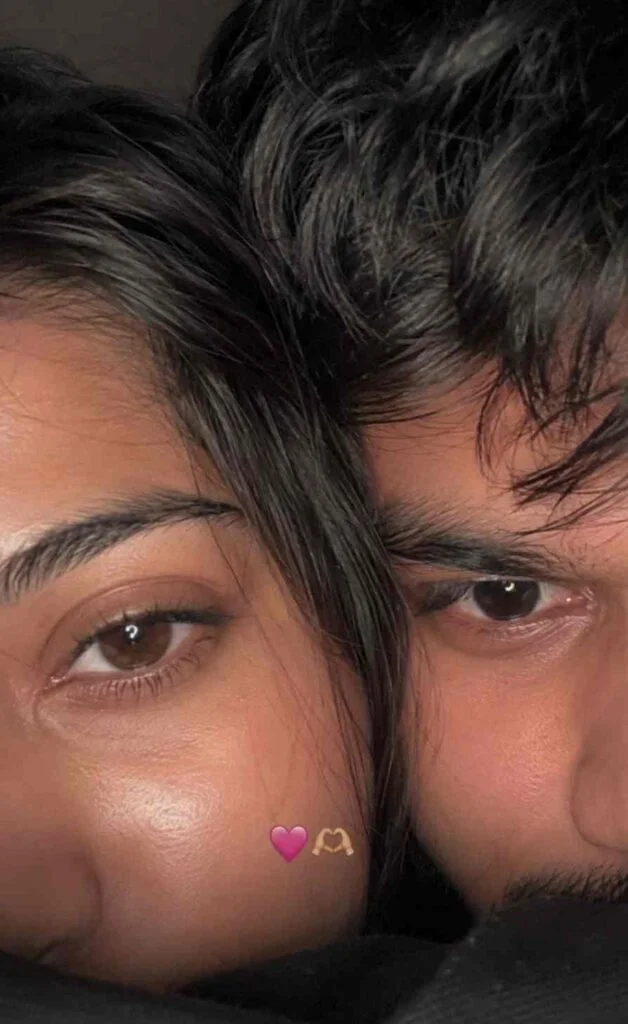
Use 100% of both faces above the image uploaded Must look exactly like a real iPhone front camera flash selfie uploaded to Instagram, not an AI-generated image. Preserve natural imperfections, realistic skin pores, sensor noise, slight blur, imperfect framing, and authentic smartphone camera artifacts.Create an ultra-realistic candid smartphone selfie of two young people with only the upper half of their faces visible, framed extremely close to the camera. Their faces are pressed together naturally, creating an intimate, cozy composition. The left person shows one eye with long natural eyelashes, while the right person has soft messy black bangs partially covering one eye. Warm hazel-brown eyes with realistic reflections, natural skin texture with tiny pores, faint acne marks and subtle imperfections. Soft black hair with loose strands falling across the face. Low-light indoor environment with a phone flash, soft overexposed highlights, slight motion blur, shallow depth of field, subtle lens softness, realistic digital camera noise, authentic smartphone HDR processing, imperfect focus, natural color tones, cozy late-night aesthetic. A tiny pink heart emoji and heart-hands emoji are placed between both faces. Vertical 9:16 composition, looks like an accidental Instagram story/photo taken on an iPhone, completely photorealistic, raw, unedited, cinematic, no beauty filter, no AI look, no plastic skin, no oversharpening, no extra details, indistinguishable from a real phone photo.
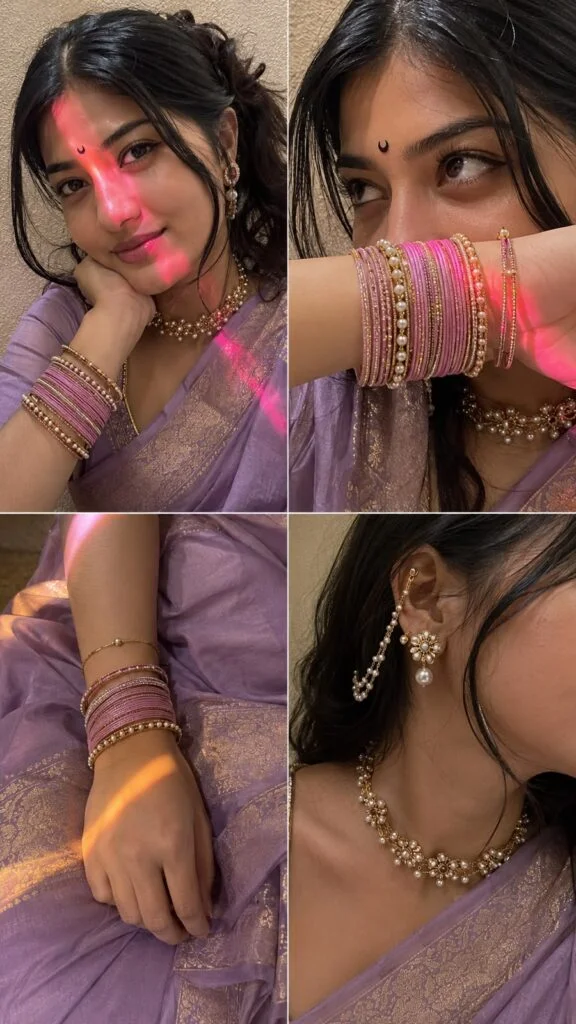
Ultra-realistic candid indoor iPhone 15 front-camera selfie collage, 2×2 grid with four equal square frames, looks like naturally captured real-life selfies instead of AI-generated art. Authentic iPhone front camera quality with subtle sensor noise, realistic fine film grain, tiny handheld motion blur, slight autofocus softness, natural HDR-off processing, no beauty filter, no skin smoothing, no over-sharpening, true-to-life skin texture with visible pores, peach fuzz, natural lip texture, realistic eye reflections, soft lens imperfections, slightly compressed smartphone image quality. Subject: Young woman wearing a lavender silk saree with intricate gold woven border and matching rose pink blouse. Small black crescent moon bindi centered on forehead. Long dark brown hair with soft waves, middle parting with loose face-framing strands. Soft natural glam makeup, warm brown eyeshadow, thin eyeliner, long natural lashes, glossy nude-pink lips, naturally flushed cheeks. Wearing a pearl-and-gold floral choker necklace, matching dangling floral earrings with ear chain attached to hair, stacked rose pink bangles mixed with gold , black and pearl bracelets, delicate bracelet on wrist. Frame 1 (Top Left): Medium close-up selfie from approximately 45–50 cm away. Subject resting chin on folded right hand, head tilted gently toward the hand, soft closed-mouth smile, looking directly into the camera. Left shoulder slightly forward. Saree draped naturally across shoulder. Background is a textured off-white and beige wall. A vivid warm pink-red light stripe crosses diagonally from upper left forehead over the left eye, nose, cheek and ends across the chin. Remaining face illuminated with warm soft flash. Frame 2 (Top Right): Tight close-up from approximately 22–25 cm away. Subject raises forearm horizontally, covering mouth and nose while displaying stacked rose pink and gold bangles. Eyes looking upward slightly to the left with calm dreamy expression. Hair strands falling naturally over forehead. Jewelry sharply visible. Warm pink-red light reflecting onto bangles and lower cheek. Frame 3 (Bottom Left): close up , her bangles resting on her lap above her saree. Frame 4 (Bottom Right): Close-up side profile from approximately 28–32 cm away. Face cropped from nose backward, highlighting ear jewelry, floral ear chain, neck and pearl choker. Saree border visible across shoulder. Head turned slightly away from camera. Hair tucked behind ear. Warm flash lighting creating realistic shine on jewelry and soft shadows beneath chin and neck. Lighting: Single iPhone front flash as primary light source with a warm ambient indoor lamp. Strong pink-red LED light streak cast diagonally across the face in the first two frames, warm golden-orange light streak in the third frame, soft warm neutral lighting in the fourth frame. Gentle falloff, realistic highlight roll-off, accurate skin reflections, subtle shadow under chin, nose and hair strands, natural specular highlights on jewelry. No studio lighting. Background: Soft indoor room with lightly textured cream wall, shallow depth perception created naturally by smartphone optics, uncluttered background, warm cozy indoor environment. Camera & Composition: Real iPhone 15 front camera, 26 mm equivalent ultra-wide selfie lens, handheld capture, natural framing, casual candid composition, authentic selfie perspective, realistic arm length distance in each frame, slight perspective distortion typical of smartphone front cameras, no cinematic depth effect, natural smartphone exposure. Color Grading: Warm amber and soft rose tones, gentle magenta highlights, realistic skin color, rich rose pink fabric, muted cream background, soft contrast, slightly lifted blacks, balanced whites, natural saturation, realistic smartphone white balance, no teal-orange grading, no artificial HDR look. Quality: Looks like an authentic real-life iPhone selfie collage captured casually indoors, not AI-generated, not digitally painted, not overly perfect. Slight sensor grain, tiny motion blur from hand movement, realistic compression artifacts, natural facial asymmetry, believable lighting, true smartphone photo realism.Aspect ratio 9:16.
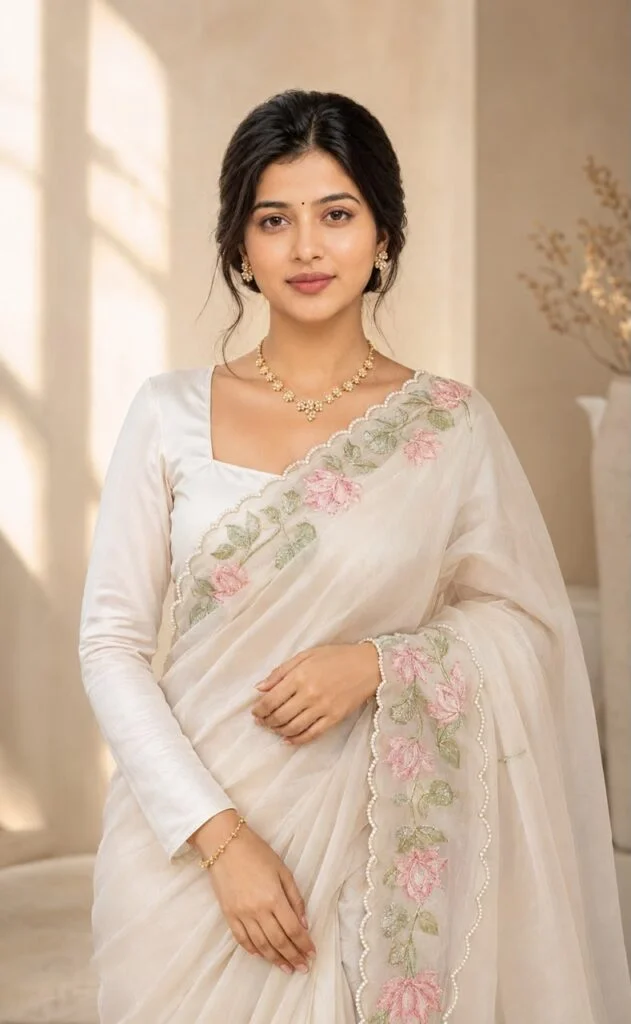
Ultra-Realistic Elegant
Portrait Prompt (Full Sleeves Version) Create an ultra-realistic, high-end editorial portrait of a beautiful young South Asian woman, preserving her face with 100% identity accuracy from the reference image. Maintain her exact facial structure, skin tone, almond-shaped brown eyes, softly arched eyebrows, small black bindi, natural nose, soft nude lips, and gentle smile. She is wearing an elegant ivory-white organza saree with delicate pink lotus flower and green leaf embroidery on the pallu.
Replace the sleeveless blouse with a matching ivory-white full-sleeve satin blouse featuring a modest square neckline. The sleeves are fitted from shoulder to wrist with a smooth, luxurious finish, creating a graceful and sophisticated appearance. The saree has a scalloped pearl-trim border and is draped neatly over the left shoulder. Her hair is styled in a neat low bun with a center part, with a few soft face-framing strands. She wears a delicate gold floral necklace, matching floral stud earrings, and a thin gold bracelet. Makeup is soft and natural with glowing skin, warm brown eyeshadow, winged eyeliner, defined brows, subtle blush, and nude glossy lips. She stands in the same elegant pose, with one hand gently holding the saree drape and the other resting naturally in front of her. Maintain the same vertical composition looking towards the camera, eye-level framing, and relaxed expression as the reference image. The background is a warm, minimalist beige interior with soft natural window light creating smooth shadows and a dreamy atmosphere. Capture with an 85mm portrait lens, f/1.8 aperture, shallow depth of field, cinematic lighting, ultra-high detail, realistic fabric texture, natural skin pores, professional color grading, 8K HDR, luxury fashion editorial photography.Ultra-Realistic Elegant Portrait Prompt (Full Sleeves Version) Create an ultra-realistic, high-end editorial portrait of a beautiful young South Asian woman, preserving her face with 100% identity accuracy from the reference image. Maintain her exact facial structure, skin tone, almond-shaped brown eyes, softly arched eyebrows, small black bindi, natural nose, soft nude lips, and gentle smile. She is wearing an elegant ivory-white organza saree with delicate pink lotus flower and green leaf embroidery on the pallu. Copy aradya_roy8342 5h
'eveless blouse with a matching
Markup sleeve satin blouse featuring a modest square neckline.
The sleeves are fitted from shoulder to wrist with a smooth, luxurious finish, creating a graceful and sophisticated
The saree has a scalloped pearl-trim border and is draped neatly over the left shoulder. Her hair is styled in a neat low bun with a center part, with few soft face-framing strands. She wears a delicate gold floral necklace, matching floral stud earrings, and a thin gold bracelet Makeup is soft and natural with glowing skin, warm brown eyeshadow, winged eyeliner, defined brows, subtle blush, and nude glossy lips. She stands in the same elegant pose, with one hand gently holding the saree drape and the other resting naturally in front of her. Maintain the same vertical composition, eye-level framing, and relaxed expression as the reference image. The background is a warm, minimalist beige interior with soft natural window light creating smooth shadows and a dreamy atmosphere. Capture with an 85mm portrait lens, f/ 1.8 aperture, shallow depth of field, cinematic lighting, ultra-high detail, realistic fabric texture, natural skin pores, professional color grading, 8K HDR, luxury fashion editorial photography. Add a small bindi. Her head is 90 degrees straight
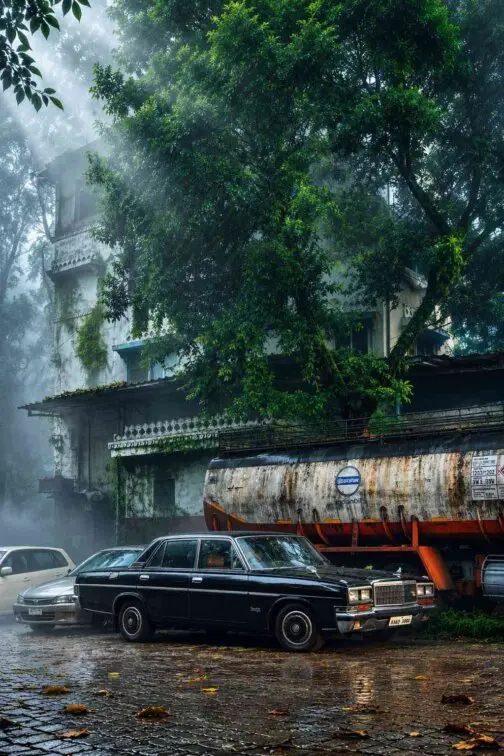
Transform this image into a breathtaking ultra -realistic foggy forest masterpiece. Add dense natural white fog covering the entire environment, creating a mysterious and cinematic atmosphere. Apply rich forest-inspired color grading with deep emerald green, dark teal, moss green, and earthy brown tones. Enhance the trees, foliage, and background elements to resemble a lush enchanted forest hidden in the mist. Introduce soft volumetric light rays subtly penetrating through the fog, creating depth and realism. Increase overall image quality to ultra-high -definition 4K resolution with razor-sharp details, HDR enhancement, realistic textures, balanced contrast, and natural color harmony. Improve shadows, highlights, and dynamic range while maintaining a realistic appearance. Add a moody woodland aesthetic, dreamy fog layers, atmospheric perspective, and professional cinematic photography grading. The final result should look like a premium DLR forest photograph captured during a coldmist.
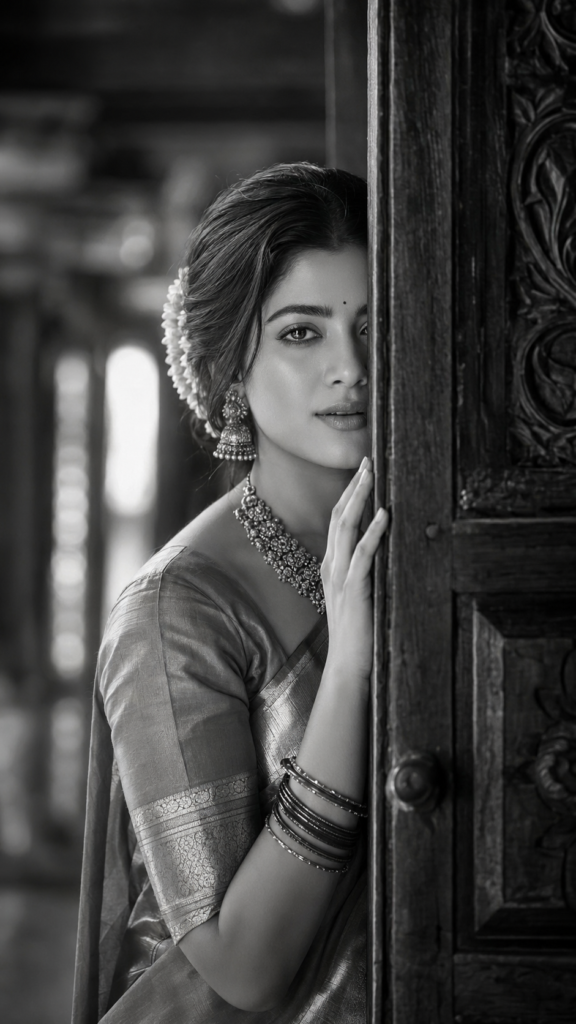
Ultra-realistic DSLR-quality 9:16 portrait of the same woman, preserving her exact face, skin tone, expressive eyes, soft smile, and small black bindi. She shyly peeks from behind an antique carved wooden door, revealing only half her face, with one hand on the frame. Wearing a South Indian silk saree, temple jewellery, jasmine bun, and maroon bangles. Soft window light, blurred heritage background, black-and-white monochrome, 85mm, f/1.8, shallow DOF, HDR, 8K, razor-sharp eye, cinematic fine-art.
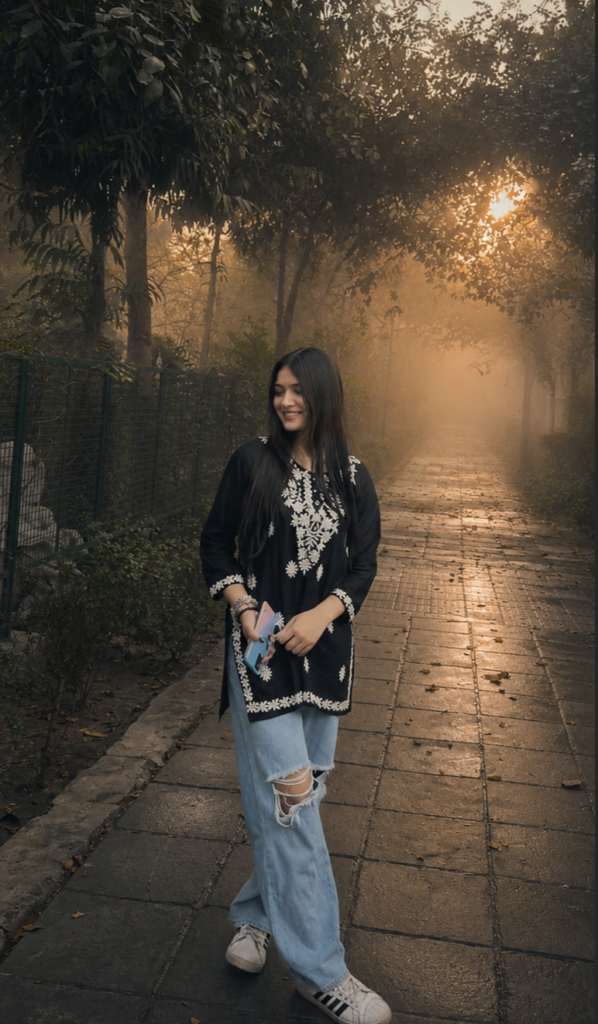
Ultra-realistic outdoor photo enhancement, preserve the original face, identity, facial features, pose, clothing, body proportions, and exact composition without any changes. Keep the person exactly as in the original image. Create a cinematic dreamy atmosphere with soft natural fog and atmospheric diffusion. The background is covered with thick mist and layered fog, creating a mysterious, peaceful, and emotional mood. Add subtle golden sunset light rays filtering naturally through the | trees from behind, blending softly with the cool green environment without overpowering the scene. The weather should feel cloudy and slightly rainy, as if it has just rained, with damp grass, soft shadows, and dim ambient lighting. Apply a moody green color grading with muted tones, realistic film colors, and gentle contrast. The sunset glow should remain subtle and cinematic, preserving the melancholic and serene atmosphere. Ultra-photorealistic, natural skin texture, realistic lighting,

organic environmental details, film photography aesthetic, cinematic color grading, soft bloom, volumetric fog, dreamy atmosphere, atmospheric perspective, realistic depth, 35mm film look, high dynamic range, not overprocessed, not Al-looking. Inspired by Wong

Kar-wai cinematography, subtle Kodak Portra 400 film tones, poetic landscape photography, editorial outdoor portrait style, melancholic mood, soft sunset backlight, natural mist diffusion, realistic depth of field, authentic cinematic storytelling convert last 7 photo in same prompt and snd it one by one
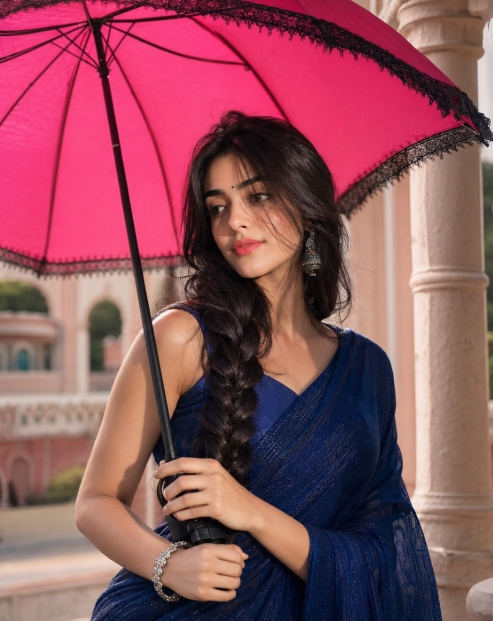
Ultra-realistic cinematic portrait of a beautiful young South Asian woman standing beneath a vibrant hot-pink umbrella during soft natural daylight. Long silky black hair in a thick side braid with soft face-framing strands, expressive brown eyes, glowing medium-fair skin, tiny black bindi, gentle smile, realistic skin texture. Exact reference pose: holding the umbrella handle with both hands, head slightly turned right, looking into the distance with an elegant posture. Deep royal-blue shimmer saree with matching blouse, oxidized silver jhumka earrings, silver bracelet. Large hot-pink umbrella with black lace trim, elegant heritage-style architecture with cream pillars and pastel walls, dreamy outdoor courtyard. Soft diffused daylight, realistic shadows, creamy background bokeh, shallow depth of field, HDR, 85mm DSLR photography, cinematic color grading, luxury Indian fashion editorial, ultra-detailed hair and fabric textures, hyper realistic, 4:5 aspect ratio. Keep my reference image face full 100% match.
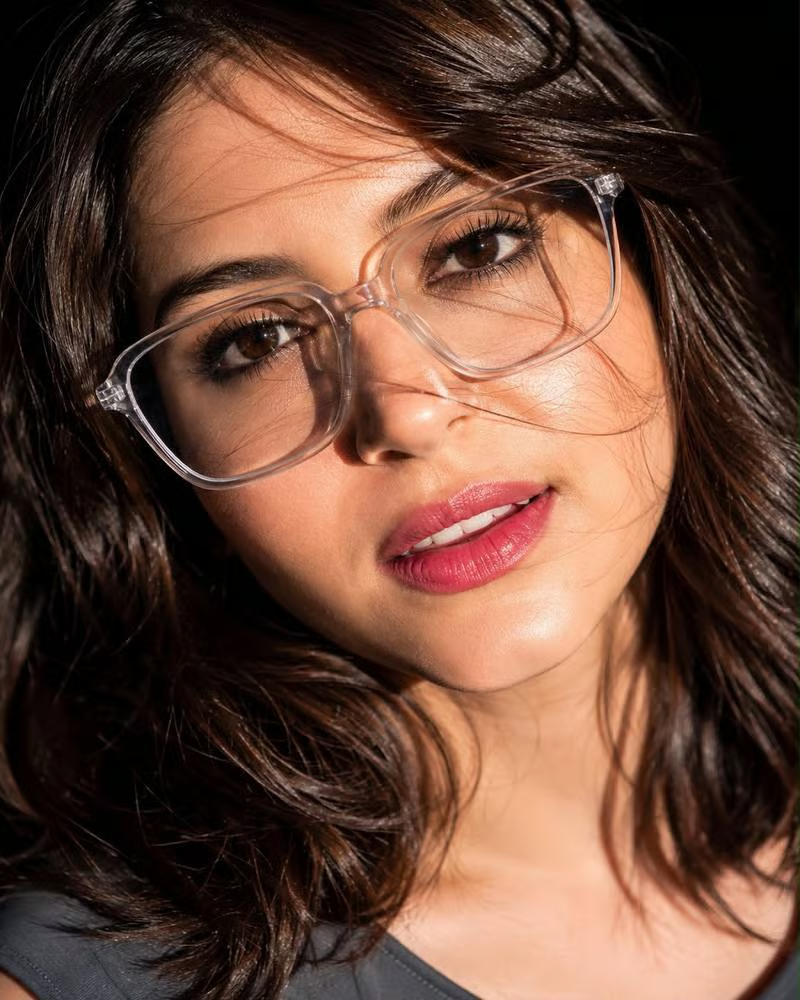
Ultra-realistic extreme close-up beauty portrait of a youngwoman in harsh midday sunlight,head tilted sideways and slightly back, direct gaze at camera, large transparent geometric glasses, long dark-brown hair flowing across the face creating natural shadow patterns,glossy pink lips, flawless realistic skin texture, defined lashes,natural brows,dramatic sunlight highlights, dark blurred background,DSLR 85mm lens, shallow depth of field, sharp focus, photorealistic, HDR, luxury.
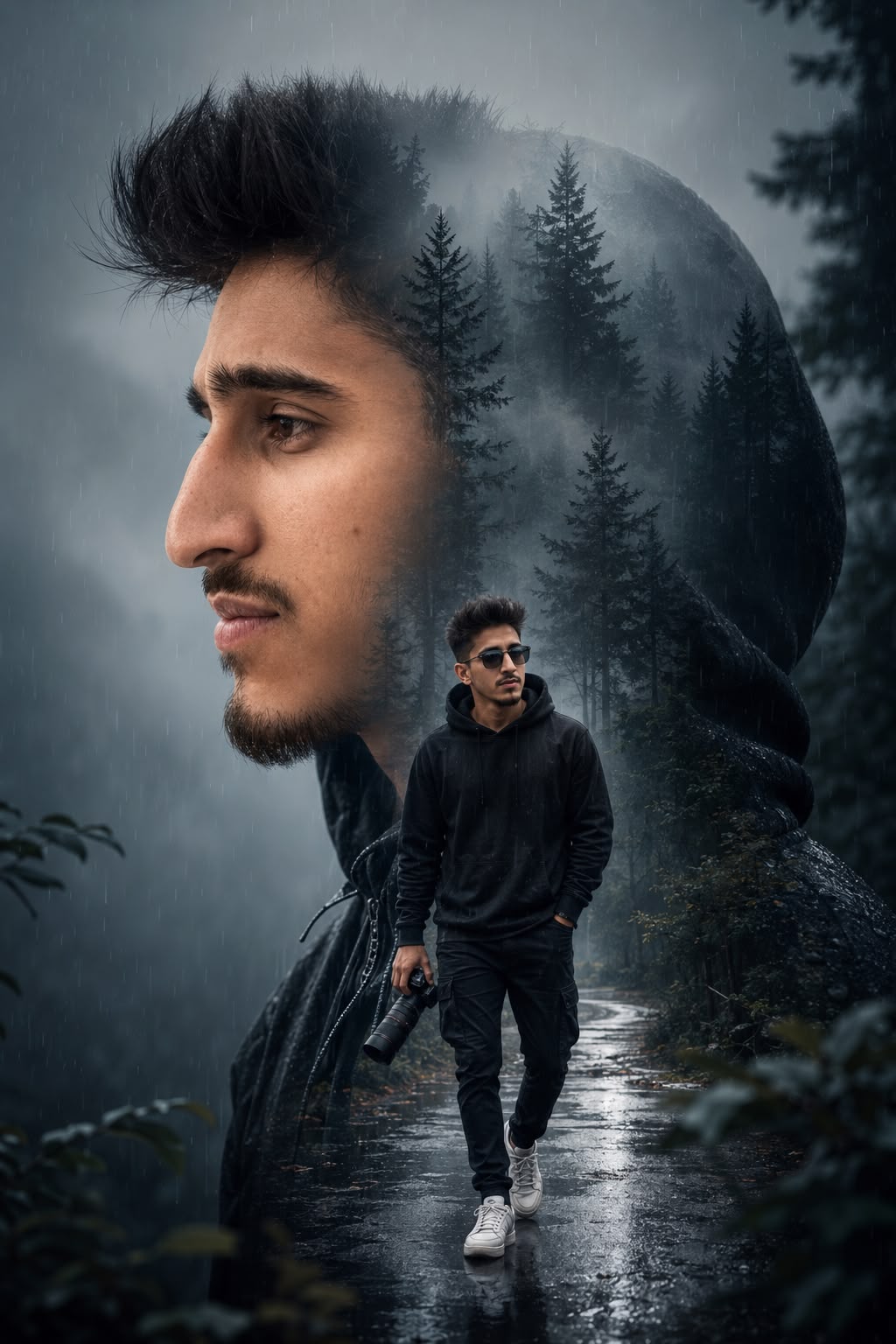
Create a cinematic double-exposure portrait using the uploaded face photo as the mandatory facial reference. Preserve the person's facial structure, hairstyle, beard details, skin tone, jawline, nose shape, and overall identity with high accuracy and realism.

Composition:

A large side-profile portrait of the person occupies most of the frame, facing left with a calm and serious expression.

The large portrait wears a dark hooded jacket or hoodie.

Inside the silhouette of the portrait, blend a mysterious foggy pine forest with tall trees and soft mist using a seamless double-exposure effect.

- Add subtle rain particles and atmospheric fog for a moody cinematic feeling.

Foreground subject:

Place a smaller full-body version of the same person walking through a wet forest road inside the silhouette.

The person wears a dark hoodie, black jeans, and white sneakers.

One hand is inside the pocket while the other hand holds

a professional DSLR or mirrorless camera with a long lens.

The person wears stylish black sunglasses with dark lenses.

Use a confident and natural walking pose while looking slightly to the side.

Style and mood:

Dark blue and grey cinematic color grading.

- Hyper-realistic photography style.

Dramatic fog, rainy atmosphere, reflective wet ground, and soft volumetric lighting.

Highly detailed skin texture, beard texture, and clothing folds.

Premium movie-poster quality composition.

Ultra-detailed, photorealistic, 8K quality, sharp focus, realistic shadows and reflections.

Important:

Replace the face with the uploaded face image while preserving identity accurately.

Keep the overall composition and double-exposure effect identical in style but personalized to the uploaded face.

Avoid cartoon or Al-art appearance; maintain realistic human proportions and natural facial features.
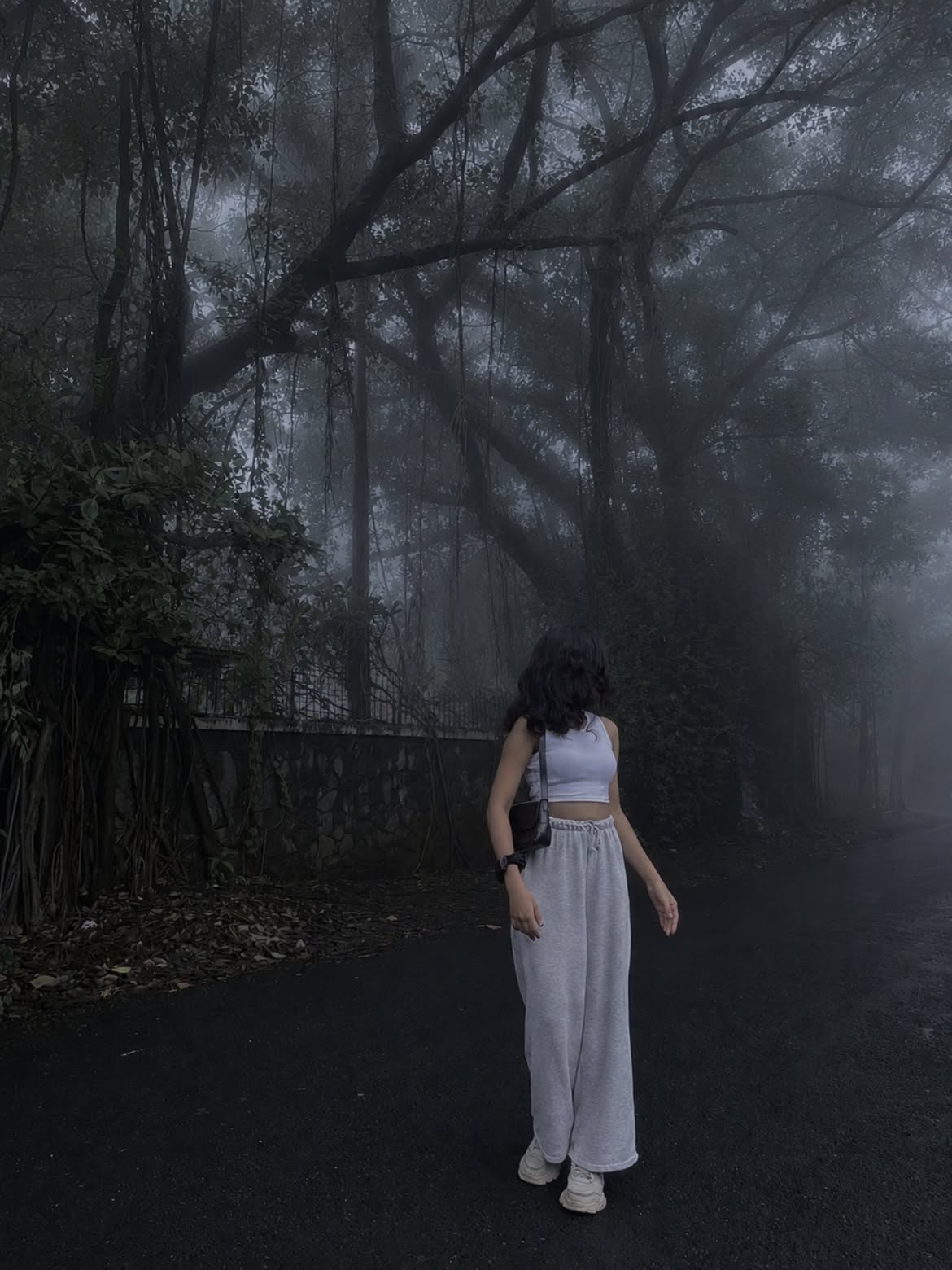
Add a thick, moody fog into the scene and darken the overall atmosphere to create a dramatic, dark aesthetic. Keep all original subjects, background details, compositions, and structures exactly as they are. Only modify the lighting and atmosphere to introduce the foggy, low-light effect without altering any core elements of the original image
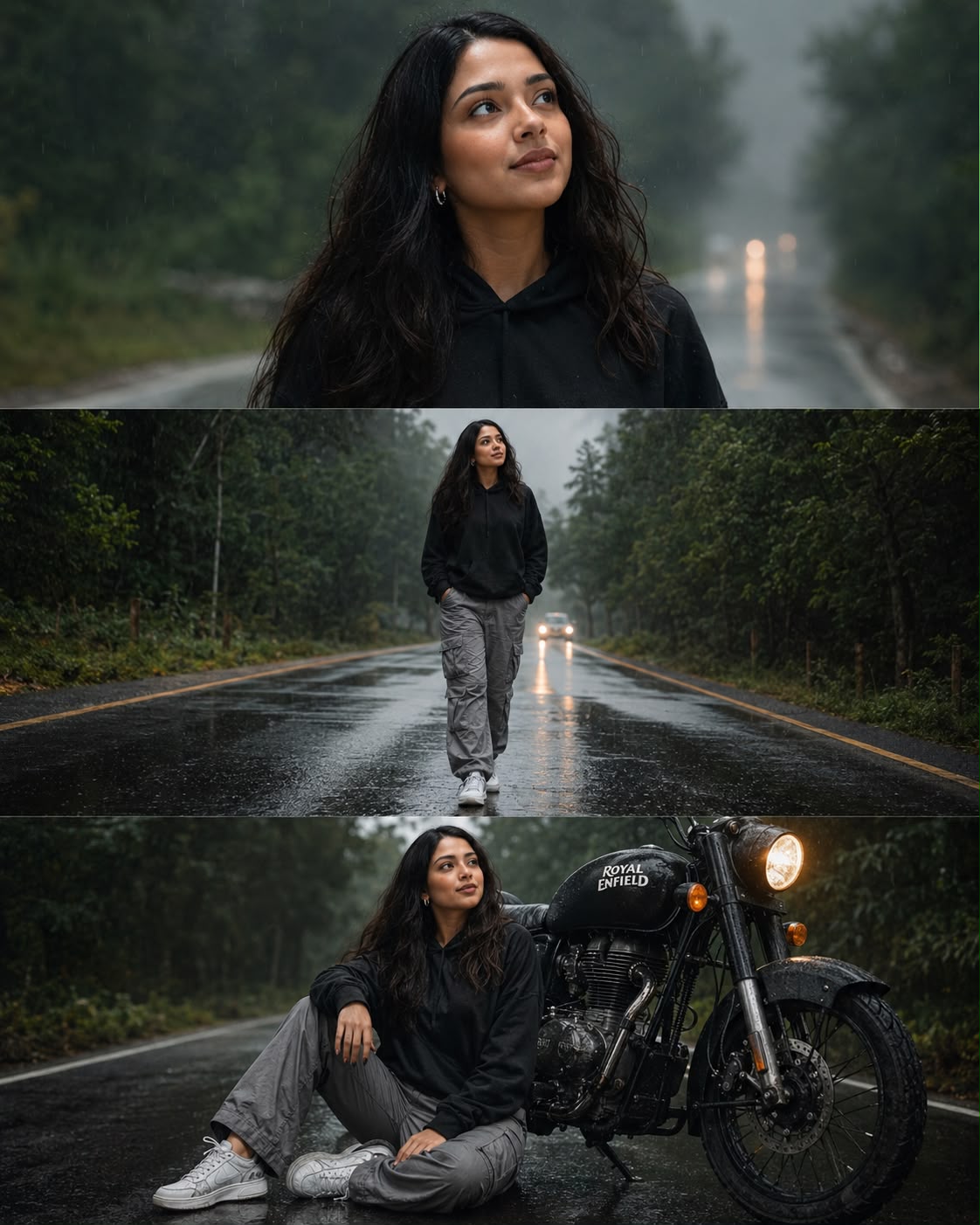
Ultra-realistic DSLR rainy road portrait collage, vertical Instagram post (4:5 ratio, 1080x1350), 3 equal horizontal cinematic panels, same beautiful young South Asian woman with long wavy black hair, glowing natural atural skin, expressive brown eyes, wearing earing a black oversized hoodie, grey cargo pants, white sneakers, sneakers, silver earrings. Misty forest highway during light rain, wet asphalt reflecting lights, moody overcast atmosphere, lush green trees on both sides, realistic raindrops, shallow depth of field.

Top panel: close-up portrait of the woman looking sideways with a soft smile, cinematic lighting, detailed skin texture, dreamy rain mist background.

Middle panel: full-body walking confidently on the empty wet road, hands in hoodie pockets, distant car headlights creating bokeh, dramatic perspective.

Bottom panel: woman sitting beside a black Royal Enfield motorcycle on the rain-soaked road, relaxed pose, motorcycle headlight on, reflective pavement, cinematic mood.

Professional photography, 85mm lens, f/1.8, HDR, ultra-detailed, natural colors, realistic shadows, photorealistic, magazine-quality, high contrast, masterpiece, 8K resolution, Instagram travel aesthetic.
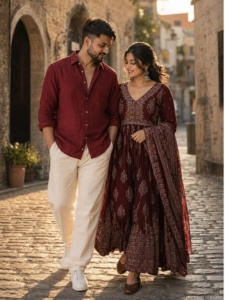
A FULL-LENGTH CINEMATIC COUPLE PORTRAIT OF A HANDSOME MAN AND A BEAUTIFUL SOUTH ASIAN WOMAN WALKING DOWN AN OLD EUROPEAN COBBLESTONE STREET DURING GOLDEN HOUR. THE MAN HAS A SHORT BEARD, WEARING A DEEP CRIMSON RED LINEN BUTTON-UP SHIRT WITH ROLLED SLEEVES, RELAXED-FIT CREAM-COLORED TROUSERS, AND CLEAN WHITE SNEAKERS. THE WOMAN IS WEARING AN ELEGANT DEEP MAROON TRADITIONAL INDIAN ANARKALI DRESS WITH DELICATE WHITE BLOCK-PRINTED PATTERNS, A MATCHING DUPATTA DRAPED OVER HER ARM, ORNATE SILVER JHUMKA EARRINGS, AND BROWN FLAT SHOES. THEY ARE LOOKING DOWN AND SMILING WARMLY AT EACH OTHER, CREATING A ROMANTIC ATMOSPHERE. WARM SUNLIGHT CASTING SOFT SHADOWS, RUSTIC STONE ARCHITECTURE IN THE BACKGROUND, CANDID MOMENT, CAPTURED ON A PROFESSIONAL 85MM LENS, SHALLOW DEPTH OF FIELD, SOFT BOKEH, HIGH-FIDELITY, VOGUE-STYLE FASHION PHOTOGRAPHY.
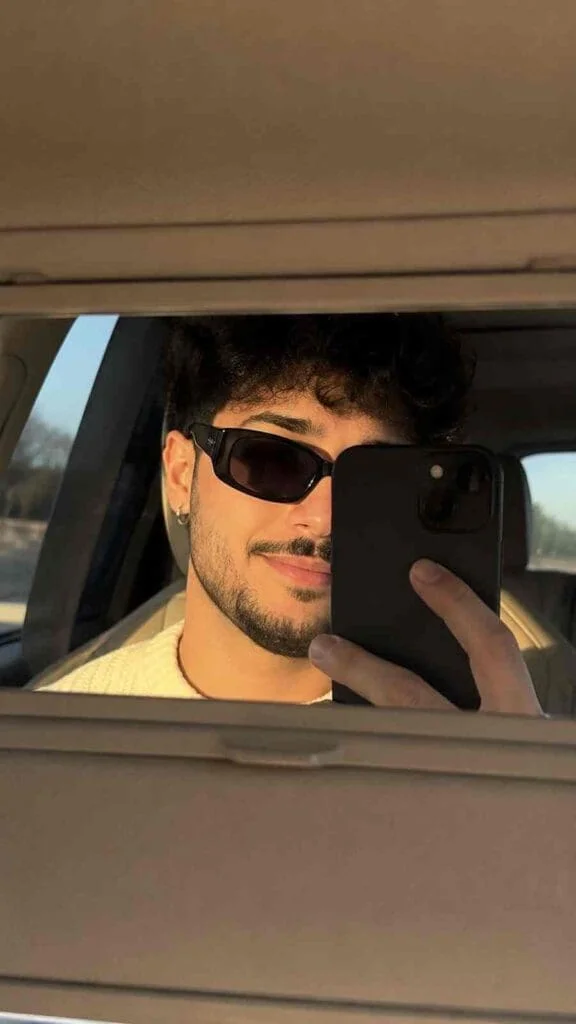
Use the uploaded image strictly as the identity reference. Preserve the exact same face structure, facial proportions, smile style, skin tone, hairstyle, hair texture, hair length, eyebrows, jawline, lips, and overall identity with maximum consistency. Do not beautify or alter facial features. The final result should look like the exact same person naturally photographed on a real iPhone camera.Create an ultra-realistic vanity mirror selfie inside a car during golden hour. The image should feel like a casual candid Instagram photo, not an AI-generated portrait. Composition is extremely important: the selfie is captured through the car’s sun-visor vanity mirror, with the mirror occupying only the middle portion of the frame while the soft beige car interior fills the top and bottom areas naturally. The framing should feel slightly accidental and imperfect, like a quick spontaneous snapshot.The boy is wearing sleek black rectangular sunglasses partially covering one eye. He has a subtle natural smile and relaxed expression. A black smartphone covers part of his face naturally while being held very close to the mirror. Small realistic details like natural skin texture, faint facial imperfections, soft reflections on the sunglasses, realistic fingers, and loose hair strands near the forehead should remain visible.Lighting should exactly match warm golden-hour sunlight entering softly from the car window, creating realistic highlights and gentle shadows across the skin, glasses, hair strands, and phone edges. Color grading must be muted, warm, creamy, and softly desaturated with lifted blacks and realistic skin tones. Avoid HDR, cinematic over-processing, over-sharpening, or artificial beauty filters.Camera quality should feel like a genuine modern iPhone selfie with slight softness, realistic reflections, subtle sensor noise, imperfect focus falloff, and authentic smartphone dynamic range. The overall vibe should feel effortlessly aesthetic, cozy, candid, premium, and extremely believable as a real social-media selfie. 9:16 aspect ratio.
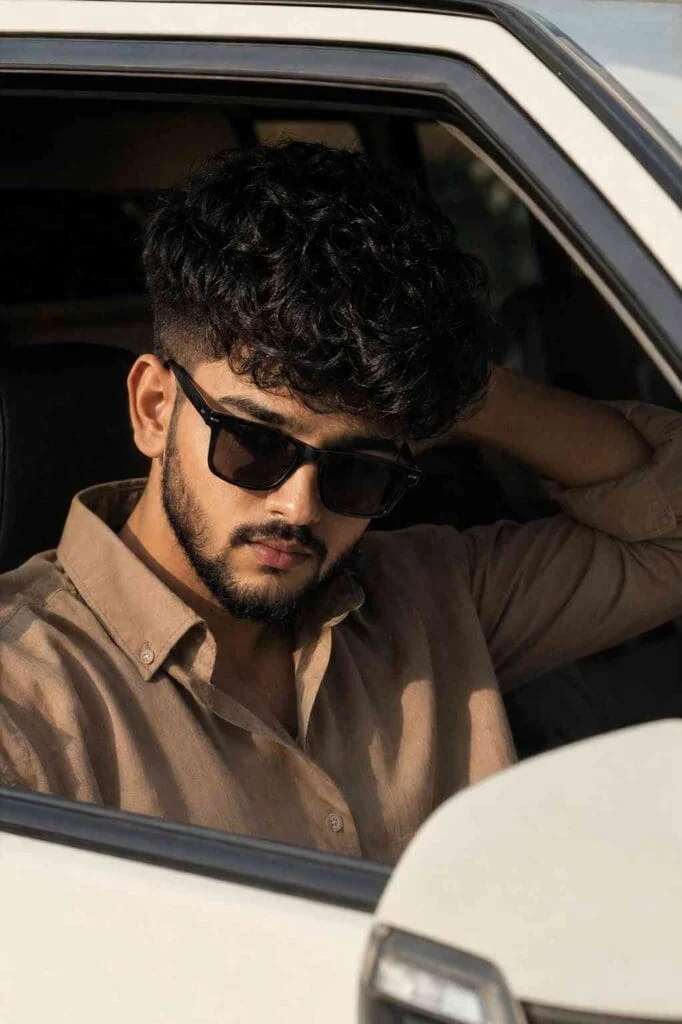
STRICT REFERENCE PRIORITY (ABSOLUTE)

The FIRST uploaded image is the MASTER REFERENCE. The SECOND uploaded image is the FACE REFERENCE ONLY.

The FIRST image is the FINAL composition. The SECOND image is ONLY the facial identity source.

DO NOT create a new portrait. DO NOT redesign. DO NOT reinterpret. DO NOT generate a similar scene.

Your task is to EDIT the FIRST image only.

Replace ONLY the facial identity of the person in the FIRST image with the facial identity from the SECOND image.

Transfer ONLY these facial characteristics from the SECOND image:

• face shape • forehead • hairline • eyebrows • eye shape • nose • lips • cheekbones • jawline • chin • beard density • beard outline • mustache • skin tone • ear shape

ABSOLUTE MASTER IMAGE LOCK

Everything from the FIRST image must remain IDENTICAL.

DO NOT change:

• camera position • camera height • camera distance • camera rotation • focal length • perspective • crop • framing • composition • pose • body position • shoulder position • arm position • hand position • head tilt • face angle • neck angle • gaze direction • eye direction • facial expression • mouth shape • lip position • jaw position • chin position • attitude • emotion • sunglasses position • sunglasses angle • hairstyle • hair volume • beard style • beard length • shirt • shirt color • shirt folds • shirt wrinkles • vehicle • window frame • side mirror • car interior • background • lighting • shadows • highlights • reflections • color grading • depth of field • film grain

IMPORTANT

The person MUST keep the EXACT SAME downward head angle, EXACT SAME gaze direction toward the car side mirror, EXACT SAME serious attitude, EXACT SAME calm expression, EXACT SAME lip position, and EXACT SAME facial pose as the FIRST image.

The ONLY difference allowed is the facial identity.

The final result must look exactly like the FIRST image was originally photographed with the person from the SECOND image.

Reference Lock: Composition: 100% Camera Angle: 100% Perspective: 100% Pose: 100% Head Tilt: 100% Face Angle: 100% Gaze Direction: 100% Facial Expression: 100% Attitude: 100% Hair: 100% Beard: 100% Clothing: 100% Vehicle: 100% Environment: 100% Lighting: 100%

Face similarity to SECOND image: Maximum possible.

Do not beautify. Do not stylize. Do not average both faces. Do not invent facial features. Do not modify the expression. Only replace the facial identity while preserving every other pixel-level characteristic of the FIRST image.
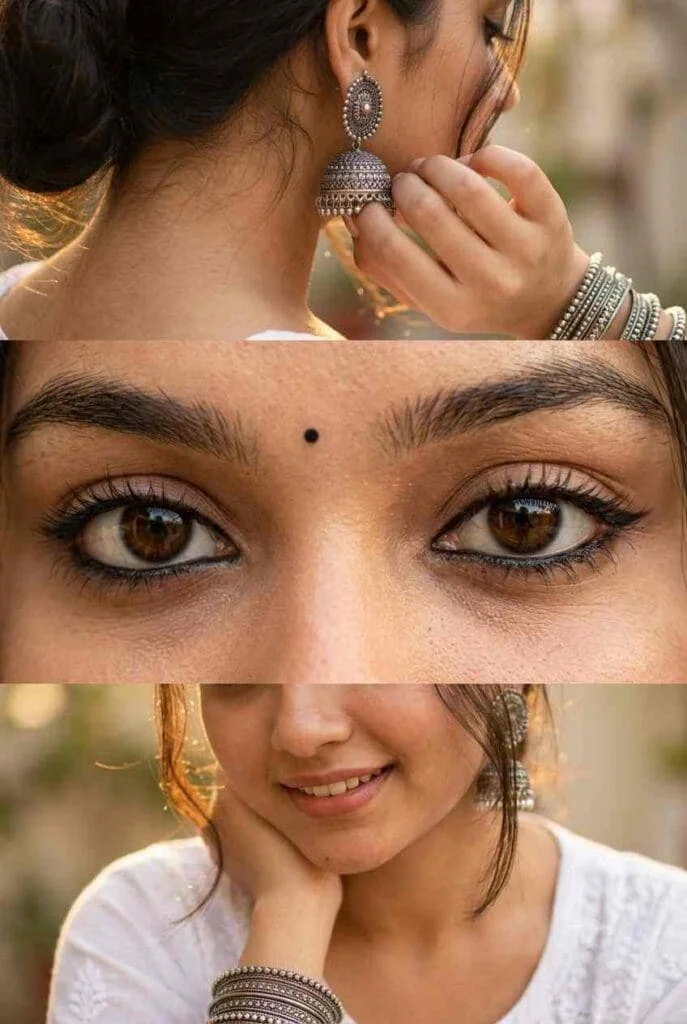
Use the uploaded reference image as the identity reference. Preserve the face, eye shape, skin tone, hairstyle, and facial features 100% exactly.

Create a premium vertical 3-panel collage.

Top panel: Close-up from behind/right side with the face mostly hidden (only a tiny cheek or jawline visible), focus on a large oxidized silver jhumka, hand gently touching the ear, stacked oxidized silver bangles, soft black kajal barely visible, loose hair strands, warm golden sunlight, creamy bokeh, shallow depth of field.

Middle panel (main focus): Ultra-realistic extreme macro close-up of both eyes with bold black kajal, subtle winged eyeliner, long natural eyelashes, thick eyebrows, glossy deep brown eyes, crystal-clear catchlights, tiny black bindi, flawless skin texture, DSLR macro photography.

Bottom panel: Lower half of the face with a soft smile, white embroidered cotton kurta, wrist resting near the face displaying oxidized silver bangles, loose hair strands, warm golden-hour lighting, soft creamy bokeh.

Photorealistic, luxury fashion editorial, Canon EOS R5, 85mm lens, f/1.8, HDR, ultra-detailed skin texture, realistic lighting, premium Instagram aesthetic, clean 3-panel layout, 8K, ultra-sharp.
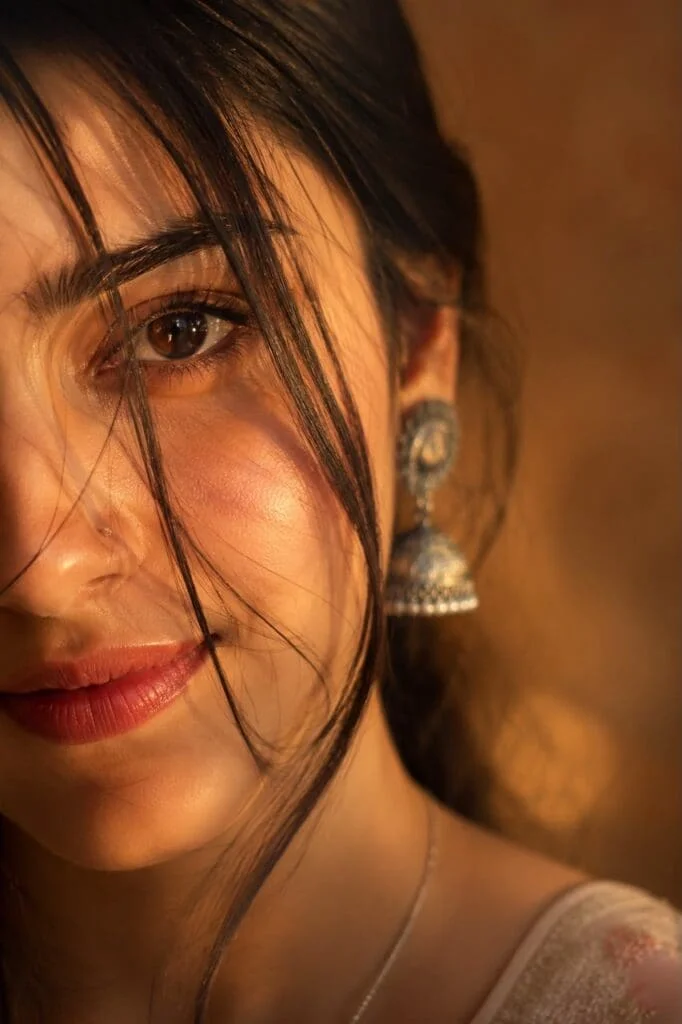
Ultra-realistic cinematic extreme close-up portrait of a young woman’s single eye filling most of the frame, captured in warm golden-hour sunlight. Focus on one deep brown eye with sharp reflections and natural catchlights, long delicate eyelashes, bold black winged eyeliner, smooth eyelid makeup with soft nude tones, thick naturally shaped dark eyebrow with visible hair texture and fine details. Skin appears soft and highly detailed with realistic pores, subtle blush on the cheek, natural warm skin tone illuminated by golden sunlight. A few loose strands of slightly reddish-brown hair gently fall across the face and eye, creating a dreamy mood. Part of her hand softly covers the lower face near the lips, adding mystery and emotion. Cinematic lighting with warm amber tones, shallow depth of field, ultra-detailed skin texture, soft shadows, natural facial details, photorealistic beauty portrait, DSLR quality, 85mm lens, f/1.4, ultra HD, 4K, highly realistic, artistic editorial photography style.
Negative prompt:
blurry eyes, extra eyes, distorted face, low quality, overexposed lighting, unrealistic skin, plastic skin texture, extra fingers, duplicate features, heavy makeup, cartoon style, deformed anatomy, low resolution, noisy image, unnatural colors.
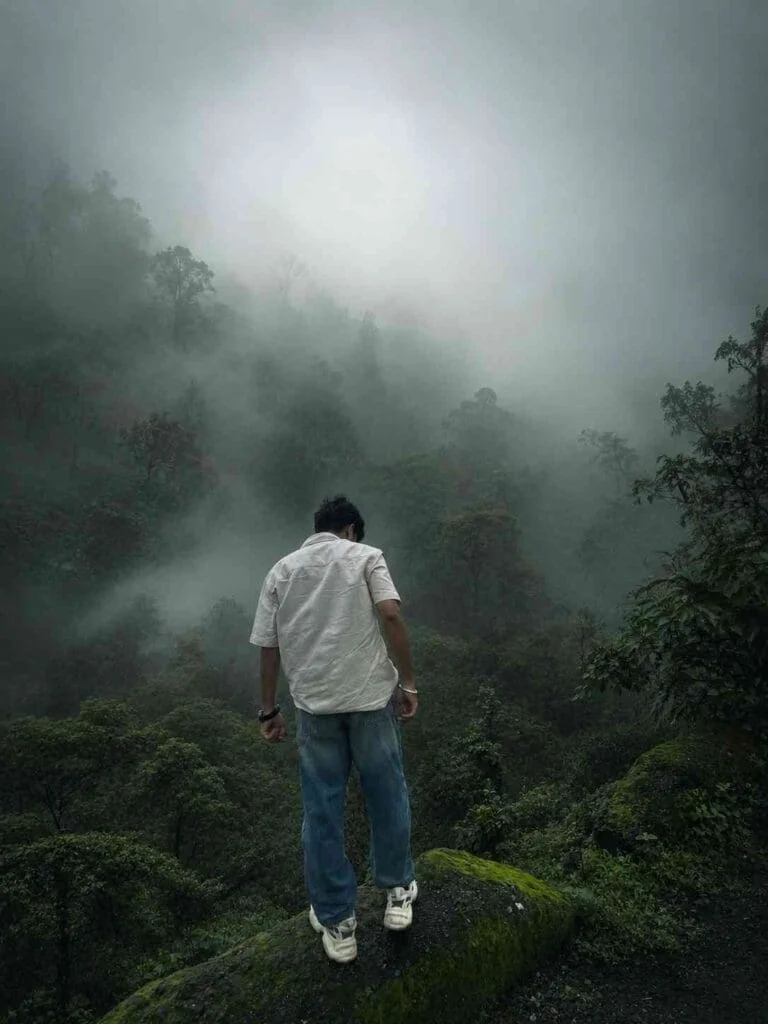
Transform this image into a breathtaking ultra-realistic foggy forest masterpiece. Add dense natural white fog covering the entire environment, creating a mysterious and cinematic atmosphere. Apply rich forest-inspired color grading with deep emerald green, dark teal, moss green, and earthy brown tones. Enhance the trees, foliage, and background elements to resemble a lush enchanted forest hidden in the mist. Introduce soft volumetric light rays subtly penetrating through the fog, creating depth and realism.
Increase overall image quality to ultra-high-definition 4K resolution with razor-sharp details, HDR enhancement, realistic textures, balanced contrast, and natural color harmony. Improve shadows, highlights, and dynamic range while maintaining a realistic appearance. Add a moody woodland aesthetic, dreamy fog layers, atmospheric perspective, and professional cinematic photography grading. The final result should look like a premium DSLR forest photograph captured during a cold misty morning, with ultra-realistic details, immersive depth, soft natural lighting, and stunning visual quality.
Style: Cinematic Forest Photography, Moody Nature, Dense Fog Weather, Volumetric Lighting, HDR, Ultra Realistic, Professional Color Grading, 4K Quality, DSLR Shot, Atmospheric Depth, Photorealistic.
How to Create Amazing AI Photos
Creating an AI-generated image is much easier than most people think. You only need an AI platform and a well-written prompt.
Follow these simple steps:
- Choose your favorite AI photo editing prompt.
- Open ChatGPT or Google Gemini.
- Paste the prompt into the chat.
- Upload your own photo using the attachment option.
- Click the Generate button.
- Wait a few moments while the AI processes your request.
- Download the finished image once it is ready.
Within minutes, you’ll receive a unique AI-generated photo that looks professionally designed.
Tips for Better AI Image Results
If you want your AI images to look more realistic, keep these recommendations in mind:
- Upload a clear, high-resolution photo.
- Use prompts with detailed descriptions.
- Mention lighting, background, clothing, camera angle, and mood.
- Avoid blurry or low-quality images.
- Experiment with different artistic styles.
- Make small prompt adjustments until you achieve your preferred look.
Even minor improvements in your prompt can produce significantly better results.
Best AI Platforms for Photo Editing
Several AI tools now offer excellent image generation capabilities. Some of the most popular options include:
- ChatGPT
- Google Gemini
- Adobe Firefly
- Microsoft Designer
- Leonardo AI
- Flux AI
- Ideogram
Each platform has unique strengths, but they all allow users to create high-quality AI images quickly.
Why Good Prompts Matter
Think of a prompt as instructions for the AI. The more descriptive and organized your prompt is, the better the final image will be.
Instead of writing a short sentence like “Create a cool photo,” include details such as:
- Facial expression
- Lighting style
- Background
- Outfit
- Camera lens
- Image quality
- Color grading
- Mood
- Artistic style
Detailed prompts help AI understand exactly what you want.
Explore More AI Prompt Ideas
If you enjoy experimenting with AI-generated images, keep exploring new prompt ideas regularly. Social media trends change quickly, and fresh prompt styles appear almost every day.
At Sonu Editor, we regularly share creative AI photo editing prompts, helpful tutorials, and practical guides that make AI image creation easier for beginners as well as experienced creators.
Whether you’re designing profile pictures, social media posts, wallpapers, or digital artwork, staying updated with new prompt trends will help you create more engaging visuals.
Final Words
AI photo editing has made professional-quality image creation accessible to everyone. With just a good prompt and a clear photo, you can generate stunning visuals in minutes without learning advanced editing software.
The key is to use detailed prompts, upload high-quality images, and experiment with different creative styles until you find your favorite results.
If you’re looking for fresh prompt collections, practical tutorials, and the latest AI image trends, be sure to visit Sonu Editor regularly. New ideas are always being added, helping you stay ahead of the latest AI photo editing trends and create images that truly capture attention.
Frequently Asked Questions (FAQs)
1. What is an AI photo editing prompt?
An AI photo editing prompt is a detailed text instruction that tells an AI image generator how to create or edit an image. The more descriptive your prompt is, the better and more realistic the final result will be.
2. Which AI tool is best for creating trending AI photos?
Several AI platforms can generate high-quality images, including ChatGPT, Google Gemini, Adobe Firefly, Leonardo AI, and Microsoft Designer. The best choice depends on your preferred style and features.
3. Can I create AI images using my own photo?
Yes. Most AI image generators allow you to upload your own photo and combine it with a detailed prompt to create realistic and personalized AI-generated images.
4. Do I need photo editing experience to use AI prompts?
No. AI photo editing tools are designed for beginners as well as professionals. You simply upload your image, enter a prompt, and let the AI generate the final result.
5. Are AI-generated images free to create?
Many AI platforms offer free image generation with daily or monthly limits. Some advanced features and higher-quality outputs may require a paid subscription.
6. How can I make my AI images look more realistic?
Use a clear, high-resolution photo and write a detailed prompt that includes lighting, background, clothing, camera angle, facial expression, and image quality. These details help the AI produce more realistic results.
7. Can I use AI-generated images on social media?
Yes. You can share AI-generated images on platforms like Instagram, Facebook, X, Pinterest, and other social media channels, provided you follow the platform’s policies and the AI tool’s terms of use.
8. What are the latest AI photo editing trends?
Popular AI editing trends include cinematic portraits, fantasy artwork, royal-style photos, anime-inspired images, cyberpunk effects, luxury lifestyle portraits, travel photography, and professional studio-style headshots.
9. Why are detailed AI prompts important?
Detailed prompts provide clear instructions to the AI, helping it understand exactly what you want. This leads to higher-quality images with better accuracy, lighting, and realistic details.
10. Where can I find new trending AI photo editing prompts?
You can discover the latest AI photo editing prompts on Sonu Editor, where new prompt ideas, tutorials, and AI image creation guides are regularly published to help you create stunning and viral AI images.